> For the complete documentation index, see [llms.txt](https://docs.talus.network/llms.txt). Markdown versions of documentation pages are available by appending `.md` to page URLs; this page is available as [Markdown](https://docs.talus.network/concepts/02-assets-and-business-state.md).
# Assets and Business State
{% hint style="info" %}
**Audience:** Agent and TAP developers.
**Goal:** Design durable application state around an Agent without confusing business assets with runtime records.
{% endhint %}
### The application owns the business model
An Agent is an on-chain identity and custody boundary, not a business-schema generator. A TAP developer decides which assets, records, capabilities, and shared objects represent the application and associates those objects with the Agent or an embedded Agent.
Business state can include coins, business assets, application records, policy objects, witnesses, and capabilities. Nexus does not prescribe the fields or lifecycle of that state; the application package defines them and its tools enforce the invariants that protect them.
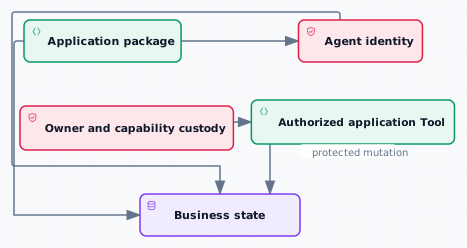
The figure separates the Agent identity from the state your application owns. A tool may mutate that state only after the application has established the intended custody and authorization relationship.
#### Common ownership patterns
* **Agent-owned assets:** every Agent has a standard `AgentPaymentVault` dynamic child; using that vault for Agent-funded work is optional, while other application assets remain under the custody chosen by the application.
* **Embedded Agent:** keep an Agent inside an application shared object when the package needs one durable object to govern its business state and skill binding.
* **Application records:** keep domain records in application-defined objects and pass the relevant object through a workflow input when a tool needs to update it.
* **Shared state:** use a shared object when several authorized transactions must access the same business state; define the mutation checks in the application package.
* **Capabilities and witnesses:** retain owner capabilities, witness IDs, and package-specific capabilities in explicit custody so an upgrade or handoff can inventory who may mutate each object.
#### Ownership and protected mutation
Nexus expresses authority with typed ownership capabilities and mutable object custody rather than a universal owner address. `OwnerCap` and `CloneableOwnerCap` identify the object or witness they govern; the application decides where each capability is stored and which package entry points may use it.
For a protected workflow step, the application can require a fixed Tool and a workflow authorization grant, while the application Tool checks its own recipient, witness, and business-state invariants. A fixed Tool is a discovery and workflow constraint; it is not a substitute for the application’s state authorization.
#### Payment is one relationship, not the whole model
Every Agent has a standard `AgentPaymentVault` child, but an application chooses whether an Agent-funded execution uses it. Payment reserves and settlement are execution accounting. Read [Payment Vaults, Reserves, and Settlement](/concepts/06-payment-vaults-reserves-and-settlement.md) for payment custody and [DAG and Execution](/concepts/05-workflow-dag-execution.md) for runtime state.
#### What does not belong here
Worksheets, walks, committed results, payment receipts, and other execution-created objects do not define the application business schema. They are introduced in [DAG and Execution](/concepts/05-workflow-dag-execution.md) and [On-Chain Result Resolution](/concepts/11-onchain-result-resolution.md).
#### Design checklist
1. Name the business assets and records that must survive a workflow run.
2. Record the object or capability that authorizes each mutation.
3. Keep Agent custody, Tool owner custody, and application-state custody explicit.
4. Decide whether each object is owned, shared, embedded, or passed as an execution input.
5. Test the invariant that protects the business state independently of workflow admission.
**Next**
Continue to [Tools and Skill Packages](/concepts/03-tools-and-skill-packages.md) to connect business-state operations to callable tools and skill bindings.
---
# Agent Instructions
This documentation is published with GitBook. GitBook is the documentation platform designed so that both humans and AI agents can read, navigate, and reason over technical content effectively. Learn more at gitbook.com.
## Querying This Documentation
If you need additional information that is not directly available in this page, you can query the documentation dynamically by asking a question.
Perform an HTTP GET request on the following URL with the `ask` and `goal` query parameters:
```
GET https://docs.talus.network/concepts/02-assets-and-business-state.md?ask=&goal=
```
`ask` is the immediate question: it should be specific, self-contained, and written in natural language.
`goal` is what the user is ultimately trying to achieve, the reason they need the answer. Sharing it helps GitBook give you a better, more relevant answer. A goal is most helpful when it describes the outcome the user wants rather than restating the question. For example, with `ask=how do I create an API token`, a goal like `build a script that syncs our docs to a CMS` lets GitBook tailor the answer to that use case.
The response will contain a direct answer to the question and relevant excerpts and sources from the documentation.
Use this mechanism when the answer is not explicitly present in the current page, you need clarification or additional context, or you want to retrieve related documentation sections.