> For the complete documentation index, see [llms.txt](https://docs.talus.network/llms.txt). Markdown versions of documentation pages are available by appending `.md` to page URLs; this page is available as [Markdown](https://docs.talus.network/concepts/03-tools-and-skill-packages.md).
# Tools and Skill Packages
{% hint style="info" %}
**Audience:** Tool developers and Agent developers.
**Goal:** Understand Tool contracts, schemas, and skill bindings before publishing a workflow.
{% endhint %}
A **Tool** is one callable capability in a workflow. An off-chain Tool is an HTTP service whose output returns to the protocol with the configured trust evidence; an on-chain Tool is a Move function whose execution and output are recorded on chain.
### Tool identity and schema
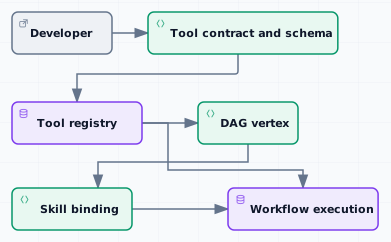
Every Tool has a fully qualified name (FQN), a registration identity, and an immutable registration-time input/output schema. A DAG vertex names the FQN; the registry resolves that name to the shared Tool and its configuration. If the FQN, module, schema, witness, or invocation contract is incompatible, publish and register a new Tool identity rather than pretending that an old workflow still has the same contract.
Registration also records the Tool kind, timeout, invocation price, verifier methods, witness information, and workflow authorization mode. Tool owner capabilities remain in the custody chosen by the registering application; the shared registry is the discovery and configuration surface.
#### Off-chain and on-chain Tools
* An **off-chain Tool** receives a typed request at its hosted endpoint and returns output or failure evidence. When its verifier mode requires it, the result includes signed or externally verifiable evidence.
* An **on-chain Tool** runs as a Move call, stamps the workflow proof, and produces a tagged output. A tagged `ok`, `err`, or application-defined variant is data that the DAG can route; it is not automatically a transaction abort.
* A **fixed Tool** requirement records a Tool dependency for a skill. The requirement should be checked together with the selected DAG vertex, registry identity, schema, witness, and application policy.
#### Skill packages
A skill packages a DAG with its Tool dependencies and execution requirements. Its record binds the published DAG, an input commitment, a payment policy, a schedule policy, fixed Tools, and an active interface revision. The Agent registry exposes that contract while Agent custody remains the lifecycle authority.
The application package can keep durable business state beside the Agent and expose thin Tool wrappers that mutate that state. See [Assets and Business State](/concepts/02-assets-and-business-state.md) for custody and [Authorization and Fixed Tools](/concepts/09-authorization-and-fixed-tools.md) for protected vertices.
#### Development surfaces
Use the CLI for repeatable wallet-authorized terminal operations, the SDK for application integration, and the exact generated [Tool reference](/reference/move/nexus_tool/tool_registry.md) for fields and signatures.
#### Tool lifecycle
1. Define the Tool schema and application invariants.
2. Publish the on-chain package or expose the hosted off-chain endpoint.
3. Register the Tool and retain the returned owner capabilities.
4. Reference its FQN from the DAG and bind the DAG to a skill.
5. Execute, verify, and settle the result through [DAG and Execution](/concepts/05-workflow-dag-execution.md), [Verifiers and Result Trust](/concepts/04-verifiers-and-result-trust.md), and [On-Chain Result Resolution](/concepts/11-onchain-result-resolution.md).
**Next**
Continue to [Verifiers and Result Trust](/concepts/04-verifiers-and-result-trust.md) to choose how a Tool result earns acceptance.
---
# Agent Instructions
This documentation is published with GitBook. GitBook is the documentation platform designed so that both humans and AI agents can read, navigate, and reason over technical content effectively. Learn more at gitbook.com.
## Querying This Documentation
If you need additional information that is not directly available in this page, you can query the documentation dynamically by asking a question.
Perform an HTTP GET request on the following URL with the `ask` and `goal` query parameters:
```
GET https://docs.talus.network/concepts/03-tools-and-skill-packages.md?ask=&goal=
```
`ask` is the immediate question: it should be specific, self-contained, and written in natural language.
`goal` is what the user is ultimately trying to achieve, the reason they need the answer. Sharing it helps GitBook give you a better, more relevant answer. A goal is most helpful when it describes the outcome the user wants rather than restating the question. For example, with `ask=how do I create an API token`, a goal like `build a script that syncs our docs to a CMS` lets GitBook tailor the answer to that use case.
The response will contain a direct answer to the question and relevant excerpts and sources from the documentation.
Use this mechanism when the answer is not explicitly present in the current page, you need clarification or additional context, or you want to retrieve related documentation sections.