> For the complete documentation index, see [llms.txt](https://docs.talus.network/llms.txt). Markdown versions of documentation pages are available by appending `.md` to page URLs; this page is available as [Markdown](https://docs.talus.network/concepts/12-scheduling.md).
# Scheduling
{% hint style="info" %}
**Audience:** Agent developers and integrators.
**Goal:** Turn a skill into a funded Task whose occurrences dispatch the right execution at the right time.
{% endhint %}
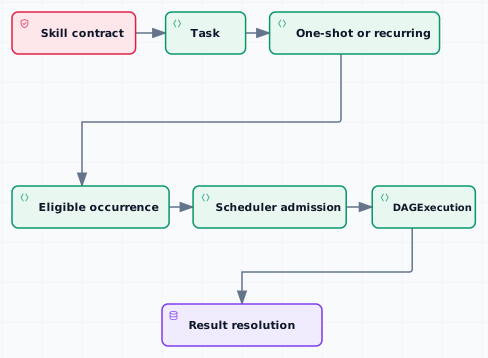
A Task is a durable schedule for one or more occurrences of a skill. Each occurrence carries timing, funding, and priority information; when it is eligible, scheduler admission can create the linked `DAGExecution`.
### Task and occurrence state
The Task owns its schedule policy, skill contract, funding source, and reserve for future work. An occurrence is the unit the scheduler advertises and dispatches. A recurring schedule creates the next occurrence only within its interval and remaining-occurrence limits; a cancelled Task stops future occurrences but does not erase an in-flight execution. A recurring schedule can support arbitrary interval, but an interval more than two days might be missed if there is a leader update, so we recommend to use interval within 48 hours.
#### Funding and admission
Schedule a Task with the funding source accepted by the skill: an Agent vault for Agent-funded work or the user/application execution source for user-funded work. Admission checks the occurrence’s timing, payment reserve, pinned Agent/DAG/Tool contract, authorization, and verifier requirements before it creates execution state.
#### Execution and settlement
Once an occurrence dispatches, follow the run in [DAG and Execution](/concepts/05-workflow-dag-execution.md). If an on-chain Tool result becomes pending, [On-Chain Result Resolution](/concepts/11-onchain-result-resolution.md) explains refill, retry, timeout, and walk advancement. The Task reserve remains associated with future or unsettled work until the matching accounting state closes.
#### Scheduling checklist
1. Confirm the skill’s payment and schedule policy.
2. Fund the matching Agent vault or user execution source.
3. Create the Task with the desired once or recurring schedule.
4. Inspect the first occurrence and its reserve before dispatch.
5. Trace the linked execution and prove settlement before closing the Task.
**Next**
Continue to [Priority-Fee Tokenomics](/concepts/13-priority-fee-tokenomics.md) when the occurrence should use priority-fee liquidity.
---
# Agent Instructions
This documentation is published with GitBook. GitBook is the documentation platform designed so that both humans and AI agents can read, navigate, and reason over technical content effectively. Learn more at gitbook.com.
## Querying This Documentation
If you need additional information that is not directly available in this page, you can query the documentation dynamically by asking a question.
Perform an HTTP GET request on the following URL with the `ask` and `goal` query parameters:
```
GET https://docs.talus.network/concepts/12-scheduling.md?ask=&goal=
```
`ask` is the immediate question: it should be specific, self-contained, and written in natural language.
`goal` is what the user is ultimately trying to achieve, the reason they need the answer. Sharing it helps GitBook give you a better, more relevant answer. A goal is most helpful when it describes the outcome the user wants rather than restating the question. For example, with `ask=how do I create an API token`, a goal like `build a script that syncs our docs to a CMS` lets GitBook tailor the answer to that use case.
The response will contain a direct answer to the question and relevant excerpts and sources from the documentation.
Use this mechanism when the answer is not explicitly present in the current page, you need clarification or additional context, or you want to retrieve related documentation sections.