> For the complete documentation index, see [llms.txt](https://docs.talus.network/llms.txt). Markdown versions of documentation pages are available by appending `.md` to page URLs; this page is available as [Markdown](https://docs.talus.network/guides/agent-usage/build-agent-package.md).
# Define an Agent Package
{% hint style="info" %}
**Audience:** Nexus adopters and integrators.
**Goal:** Create a registry-Agent skill artifact from an already published DAG without publishing a custom Move package.
{% endhint %}
A Talus Agent is an on-chain identity with one active registry contract per Skill. A Skill binds a published DAG to payment, schedule, input-commitment, and fixed-Tool requirements. This guide uses the CLI's Talus Agent Package (TAP) `tap` namespace to build a skill artifact from an existing DAG; it does not scaffold or publish a TAP Move package. Package-owned state follows the separate [TAP Development](/guides/tap-development.md) path.
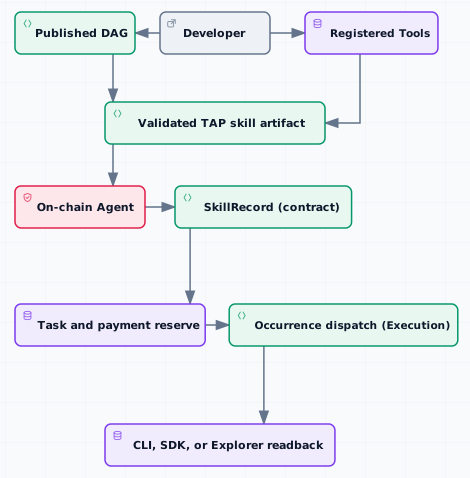
The architecture figure separates the artifact-building step from on-chain ownership: the DAG and Tool records are inputs, the artifact is a validated handoff, and only the bind/register transaction creates the Agent and Skill state that a later Task can execute.
### Prerequisites
* A Bash/POSIX-compatible shell plus `jq`, `curl`, and coreutils-compatible `sha256sum`, `stat`, and `mktemp` for the documented checks. Node.js 18 or later is needed only for the hosted Nexus API tutorial or its React example.
* Verify the shell tools with the [Developer Setup](/guides/getting-started/setup.md) check before using the commands below.
* Complete [Developer Setup's protected-signer gate](/guides/getting-started/setup.md) first. Without provider-approved protected import and `nexus conf set --help` verification, stop at query-only SDK/Explorer/API inspection and do not run Nexus mutation commands.
* After that gate is complete, a configured Nexus environment (`nexus conf`) and signer SUI address balance verified with `nexus gas balance` and funded with `nexus gas deposit`; use an owned gas coin only when a command explicitly requests one. Use AgentPaymentVault only for agent-funded execution funding.
* At least one registered tool to reference — see [Build an off-chain tool](/guides/tool-development/build-offchain-tool.md) or [Build an on-chain tool](/guides/tool-development/build-onchain-tool.md).
* A validated, published DAG that wires those Tools together. Start with [DAG Construction](/guides/dag-construction.md), run `nexus dag validate --path `, publish it, and retain the returned DAG object ID.
#### The agent model
An agent is an `Agent` object: an on-chain identity that allocates a monotonically increasing *skill id* for each skill you register against it, and holds an `AgentPaymentVault` for agent-funded work. Each skill carries a `SkillRequirement` describing three things a caller must satisfy:
* **A payment policy** (`SkillPaymentPolicy`), one of:
* `UserFunded` — the submitting signer supplies the address-funded Task reserve at Task creation; an explicit `refund_recipient` controls where the remaining address-funded reserve returns.
* `AgentFunded { max_budget_mist }` — the agent's vault pays, up to a per-skill maximum budget in MIST.
* **A schedule policy** (`SkillSchedulePolicy`) — either `Once` or `Recurring`, with the recurring form carrying its minimum interval and maximum number of occurrences.
* **Fixed-tool requirements** — zero or more `FixedTool { tool_registry_id, tool_fqn }` entries that record required Tool FQNs. Registration checks that each FQN is registered at transaction time; it does not independently enforce the stored registry ID or prove DAG membership. This does not authorize asset movement; separately read back the selected DAG vertex, Tool ID, registry ID, schema, and authorization/application checks. See [Authorization and fixed Tools](/concepts/09-authorization-and-fixed-tools.md).
#### Step 1 — Inspect the live DAG and Tools
Record the published DAG ID and inspect every fixed Tool before creating the artifact:
```bash
export DAG_ID=
nexus dag inspect --dag-id "$DAG_ID" --json > dag.json
nexus tool inspect --tool-fqn --json > tool.json
```
Confirm the DAG vertices, entry groups, Tool registry IDs/FQNs, schemas, and verifier modes match the Skill you intend to register.
#### Step 2 — Create the registry-skill artifact
Create a user-funded, one-run artifact from explicit inputs and fetched DAG data:
```bash
nexus tap create-skill-artifact \
--skill-name portfolio-rebalance \
--dag-id "$DAG_ID" \
--interface-revision 1 \
--payment-mode user-funded \
--recurrence-kind once \
--fixed-tool = \
--out ./artifact.json
```
For Agent-funded work, use `--payment-mode agent-funded --agent-funded-max-budget-mist `. Use `--recurrence-kind recurring`, `--min-interval-ms`, and `--max-occurrences` only when the Skill policy permits recurrence. Repeat `--fixed-tool` for each exact Tool identity. This command creates an artifact; it does not publish a package, create an Agent, or register a `SkillRecord`.
#### Step 3 — Choose how the Agent is created
```mermaid
sequenceDiagram
participant Developer
participant CLI as Nexus CLI
participant Wallet as Sui signer
participant Registry as Agent registry
Developer->>CLI: Inspect DAG and Tools
CLI-->>Developer: IDs, schemas, FQNs, and verifier state
Developer->>CLI: Create artifact
CLI-->>Developer: artifact.json
alt New Agent and first Skill
Developer->>Wallet: Sign tap bind transaction
Wallet->>Registry: Create Agent and register Skill
else Existing Agent
Developer->>Wallet: Sign create-agent or register-skill transaction
Wallet->>Registry: Update Agent and Skill records
end
Registry-->>Developer: Agent/Skill IDs and transaction effects
```
This sequence shows the two creation paths and their shared verification boundary: artifact validation does not publish a package or create state, and the registry transaction is not complete until the signer reads back the returned Agent and Skill identities.
You have two paths to an on-chain agent, depending on whether the agent already exists:
* **New agent, first skill, atomically.** `nexus tap bind --artifact ` creates a Talus agent and registers its first skill in a single transaction. Reach for this when you are standing up a brand-new agent around one skill.
* **Separate steps.** `nexus tap create-agent` mints an empty `Agent`; later `nexus tap register-skill --artifact --agent-id ` attaches a skill to it. Reach for this when one agent owns several skills, or when the agent already exists.
Both paths consume a *publish artifact*, produced when you publish the skill. The full publish-and-register flow is [Register a skill package](/guides/agent-usage/register-skill-package.md); this guide stops at a validated config.
#### Step 4 — Fund the Agent vault (Agent-funded Skills)
If any skill uses the `AgentFunded` payment mode, the agent's vault must hold enough SUI to cover executions. Deposit into the vault once the agent exists:
```bash
nexus tap vault deposit --agent-id --amount
nexus tap vault balance --agent-id
```
For a user-funded skill, the vault is not needed — the submitting signer supplies the address-funded Task reserve (see [Execute and settle an agent](/guides/agent-usage/execute-and-settle-agent.md)); a later caller or leader does not change the recorded payment source.
#### Step 5 — Authorization and fixed Tools
When a skill pins a fixed tool that moves assets, the skill's DAG should be authored with the matching FQN and the Tool should be registered with cap-gated authorization so only an authorized worksheet can invoke it. Defining the fixed-tool requirement here is only half the contract; [Authorization and fixed Tools](/concepts/09-authorization-and-fixed-tools.md) explains the corresponding authorization path. The pinned check requires the FQN to be registered at transaction time, while the client/operator must separately read back the selected DAG vertex, `tool_registry_id`, Tool ID, and immutable schema; do not treat the Fixed Tool field as proof of DAG membership or asset authority.
#### Verification checklist
Your agent package is ready to publish when:
* `artifact.json` exists and records the inspected DAG ID, Skill name, interface revision, payment policy, schedule policy, and fixed Tools;
* every artifact Tool registry ID/FQN is verified against the inspected live Tool record and the selected DAG vertex;
* every fixed-tool requirement names a registered tool by exact registry ID and FQN, while the readback remains the client/operator verification rather than an extra on-chain Fixed Tool guarantee;
* the payment mode matches your intent (user-funded vs agent-funded with a budget);
* if agent-funded, you have a plan to fund the agent vault after the agent exists.
#### Common failure modes
| Symptom | Likely cause and fix |
| --------------------------------------- | --------------------------------------------------------------------------------------------------------------------------- |
| Artifact creation rejects the DAG | The DAG ID is unavailable or its live shape does not match the requested requirements. Re-inspect the DAG and Tool records. |
| Fixed-tool requirement not satisfied | The `tool_registry_id`/`tool_fqn` pair does not match a registered tool. Confirm with `nexus tool inspect --tool-fqn …`. |
| Agent-funded execution fails at runtime | The AgentPaymentVault balance is below the skill's `max_budget_mist`. Fund the Agent vault before scheduling more work. |
Artifact construction validates metadata and fetched DAG facts, not representative runtime inputs. Use a Task flow to validate actual inputs after registration.
#### Next guides
* [Register a skill package](/guides/agent-usage/register-skill-package.md) — attach the artifact to a new or existing Agent and make the Skill discoverable.
* [Execute and settle an agent](/guides/agent-usage/execute-and-settle-agent.md) — run a skill end-to-end and settle payment.
* [Authorization and fixed Tools](/concepts/09-authorization-and-fixed-tools.md) — understand the grant and fixed-Tool contract for an agent skill.
---
# Agent Instructions
This documentation is published with GitBook. GitBook is the documentation platform designed so that both humans and AI agents can read, navigate, and reason over technical content effectively. Learn more at gitbook.com.
## Querying This Documentation
If you need additional information that is not directly available in this page, you can query the documentation dynamically by asking a question.
Perform an HTTP GET request on the following URL with the `ask` and `goal` query parameters:
```
GET https://docs.talus.network/guides/agent-usage/build-agent-package.md?ask=&goal=
```
`ask` is the immediate question: it should be specific, self-contained, and written in natural language.
`goal` is what the user is ultimately trying to achieve, the reason they need the answer. Sharing it helps GitBook give you a better, more relevant answer. A goal is most helpful when it describes the outcome the user wants rather than restating the question. For example, with `ask=how do I create an API token`, a goal like `build a script that syncs our docs to a CMS` lets GitBook tailor the answer to that use case.
The response will contain a direct answer to the question and relevant excerpts and sources from the documentation.
Use this mechanism when the answer is not explicitly present in the current page, you need clarification or additional context, or you want to retrieve related documentation sections.