> For the complete documentation index, see [llms.txt](https://docs.talus.network/llms.txt). Markdown versions of documentation pages are available by appending `.md` to page URLs; this page is available as [Markdown](https://docs.talus.network/guides/agent-usage/execute-and-settle-agent.md).

# Execute and Settle an Agent

{% hint style="info" %}
**Audience:** Nexus adopters and integrators.

**Goal:** Run an Agent skill through a Task and verify the execution, payment settlement, and durable receipts before scheduling more work.
{% endhint %}

> **Before executing a command:** Verify that the selected CLI/SDK bindings, package IDs, RuntimeAuthority root, and transaction effects agree with the target network.

Nexus execution begins with a `Task`. A scheduled `Occurrence` dispatches one `Execution`; observation and settlement return through the occurrence. The retired `nexus dag execute` and `nexus tap execute` command paths are not part of this interface.

### Execution and payment lifecycle

The immediate `--now` flow still uses the scheduler. The Task holds reusable work and a reserve, the occurrence is the durable opportunity to run it, and dispatch creates the ordinary Execution and payment that leaders advance.

<figure><picture><source srcset="/files/GoBAe6AF4Ha5hJkb5OQw" media="(prefers-color-scheme: dark)"><img src="https://2322144477-files.gitbook.io/~/files/v0/b/gitbook-x-prod.appspot.com/o/spaces%2FlV9L0m4FfiDv8fzxk6cT%2Fuploads%2Fgit-blob-3f783db97f78e191a9c1dda70a0eb14228738233%2Fd20-schedule-reserve-light.svg?alt=media" alt="Schedule a Task and split its reserve"></picture><figcaption><p>Phase 1: Schedule a Task and attach source funding. Keyed facts: the User / Agent controller uses Nexus CLI with schedule --now; Scheduler Task attaches the Skill policy and creates TaskPaymentReserve from the original User / Agent source before advertising an eligible occurrence to Leader.</p></figcaption></figure>

<figure><picture><source srcset="/files/9YgQSADIrUh2dSqo9E3G" media="(prefers-color-scheme: dark)"><img src="https://2322144477-files.gitbook.io/~/files/v0/b/gitbook-x-prod.appspot.com/o/spaces%2FlV9L0m4FfiDv8fzxk6cT%2Fuploads%2Fgit-blob-c41496d57ca4096f6188829b1d13ee931367ea40%2Fd20-execute-payment-light.svg?alt=media" alt="Create ExecutionPayment and run Tool vertices"></picture><figcaption><p>Phase 2: Dispatch an occurrence and reconcile its payment. Keyed facts: Scheduler dispatches Leader; Leader runs Tools through DAGExecution; Scheduler creates the exact vertex ExecutionPayment lock; Invocation applies the exact policy and charges or refunds; terminal outcome returns to Scheduler.</p></figcaption></figure>

<figure><picture><source srcset="/files/4DhB0BGqXZrP1jIb1NXl" media="(prefers-color-scheme: dark)"><img src="https://2322144477-files.gitbook.io/~/files/v0/b/gitbook-x-prod.appspot.com/o/spaces%2FlV9L0m4FfiDv8fzxk6cT%2Fuploads%2Fgit-blob-690ff8899ffd4d8c8c507dce21908f20fa8a97ce%2Fd20-close-refund-light.svg?alt=media" alt="Close the Task and return remaining reserve"></picture><figcaption><p>Phase 3: Settle occurrence and return unused reserve. Keyed facts: Maintainer or permissionless maintenance settles finished work; the User / Agent controller separately closes an idle Task through Scheduler; ExecutionPayment restores unused occurrence funds into TaskPaymentReserve before the reserve returns to its recorded User / Agent funding source.</p></figcaption></figure>

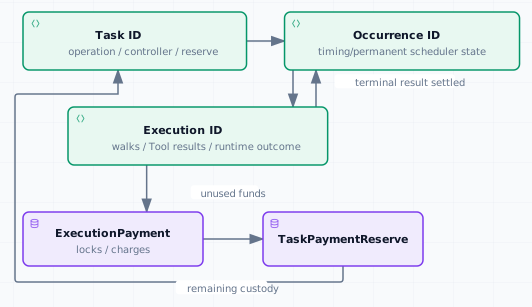
This diagram intentionally stops at Task, Occurrence, Execution, `ExecutionPayment`, result, and reserve state. The policy-backed Invocation and receipt path adds the exact Tool-policy identity. If a hosted projection omits an `Invocation` ID, use matching CLI/SDK object reads and transaction effects rather than inferring it from a cashier, FQN, or UI label.

Keep the three identities together because each answers a different question:

<figure><picture><source srcset="/files/2LpzxGQVPY506nOOBWmN" media="(prefers-color-scheme: dark)"><img src="https://2322144477-files.gitbook.io/~/files/v0/b/gitbook-x-prod.appspot.com/o/spaces%2FlV9L0m4FfiDv8fzxk6cT%2Fuploads%2Fgit-blob-1a9905d7a587f9f8c41a32a1b38970fd37324e6d%2Ff12-execute-settle-agent-light.svg?alt=media" alt="Task execution payment lifecycle"></picture><figcaption></figcaption></figure>

#### Choose the operation and controller

When the operation uses `--dag-id` without `--agent-id`, verify the deployment-operator-provisioned, registry-owned default executor first with `nexus tap default-agent show --json`. A missing result or `AgentRegistry missing default agent`/`EDefaultDagExecutorMissing` means the deployment has not bootstrapped the shared default Agent; stop and hand the setup to the deployment operator rather than retrying any default-DAG Task command.

Choose the operation:

* `--dag-id` without `--agent-id` creates a default-DAG Task controlled by the active signer address.
* `--agent-id` plus `--skill-id` creates an Agent-skill Task. Add `--agent-funded` to reserve funds from that Agent's payment vault and make the Agent the controller; without it, the active signer address funds and controls the Task.

The `TaskPointer` returned to an address is discovery metadata: it lets `nexus task list` find the Task. Owning the pointer does not grant controller authority. Controller-gated Schedule and lifecycle mutations check the active signer address or supply and verify the controlling Agent. Occurrence settlement and zero-charge expiration are permissionless maintenance operations once their on-chain preconditions hold.

Add `--pause-on-failure` to `nexus task create` or `nexus task schedule` when an unsuccessful occurrence should pause later dispatch. Omit it for the default continue-on-failure policy used below.

#### Prepare transaction gas and Task funding

Owned faucet coins and the signer's SUI address balance are separate. Commands below omit `--sui-gas-coin`, so their immediate gas uses the address balance; an address-funded Task also withdraws its prepayment from that balance. Inspect both stores and deposit enough before the first Nexus mutation:

```bash
nexus gas balance --json
nexus gas deposit --amount 300000000 --json
nexus gas balance --json
```

When starting from zero, this example covers the default 100,000,000-MIST DAG-publication gas budget plus the example's 50,000,000-MIST Task reserve and 100,000,000-MIST scheduling gas budget. The owned coin selected by `gas deposit` must cover its 300,000,000-MIST deposit and its own transaction gas budget. Skip or adjust the deposit when already funded, and inspect the remaining balance before settlement and closure. For an Agent-funded Task, the Agent vault supplies the reserve, while the signer still needs transaction gas. An explicit `--sui-gas-coin` can fund transaction gas from an owned coin, but does not replace an address-funded Task's reserve requirement.

#### Persist the input

Write the input once and validate that it is canonical JSON before scheduling:

```bash
jq -cS . input.json > task-input.json
sha256sum task-input.json > task-input.sha256
```

For ordinary input values, keep the existing shorthand: one JSON value becomes inline data, and an array becomes inline many. When an entry must preserve a typed NexusData form, pass an exact one-key `one` or `many` object whose inner value(s) have `kind: "object"`, `kind: "data"`, or `kind: "walrus"`. An ordinary one-key JSON object without an inner `kind` is still shorthand inline data, not a typed envelope.

Remote inputs are materialized before Task construction. The Task command does not return a separate storage receipt, so retain the canonical source input, its checksum, the exact `--remote VERTEX.PORT` selection, and the resulting Task receipt. The materialized remote value stored in Task inputs carries its content digest.

#### Schedule one default-DAG run

In v2.1.1, publish a DAG before scheduling its first run. If you already have a published DAG, reuse its ID. For a new DAG, set `DAG_PATH` below to the JSON artifact created in the [DAG construction guide](/guides/dag-construction/math-branching-dag-builder.md):

```bash
export DAG_PATH="./dag.json"
test -f "$DAG_PATH"
nexus dag validate --path "$DAG_PATH"
nexus dag publish --path "$DAG_PATH" --json > dag-receipt.json
export DAG_ID="$(jq -er '.dag_id' dag-receipt.json)"
nexus dag inspect --dag-id "$DAG_ID" --json > dag.json
```

Choose `ENTRY_GROUP` and the input fields from the inspected DAG. Publication creates the DAG; it does not start an Execution. Both `--prepay-amount-mist` and `--occurrence-budget-mist` are required by `task create` and `task schedule`, including a one-off `--now` run. The first funds the Task reserve; the second caps the amount available to each occurrence. The example uses 50,000,000 MIST for each; choose amounts appropriate to the intended run and keep immediate transaction gas separate.

Before this command, verify the deployment-operator-provisioned, registry-owned default executor with `nexus tap default-agent show --json`. A missing result or `AgentRegistry missing default agent`/`EDefaultDagExecutorMissing` means the deployment has not bootstrapped the shared default Agent; stop and hand the setup to the deployment operator rather than retrying the Task command.

```bash
nexus task schedule \
  --dag-id "$DAG_ID" \
  --entry-group "$ENTRY_GROUP" \
  --input-json "$(jq -c . task-input.json)" \
  --prepay-amount-mist 50000000 \
  --occurrence-budget-mist 50000000 \
  --now \
  --priority-fee-percentage 20 \
  --json > task-receipt.json
```

The percentage defaults to 20 when omitted and valid explicit values are 10 through 10,000. The interface has no per-gas-unit priority flag or default-zero model.

#### Schedule one Agent-skill run

First inspect the selected skill’s DAG and authorization requirements. The high-level command below is runnable only when every selected vertex is unprotected. If the skill contains protected vertices, stop before submission: use the lower-level Move constructor with its `VecMap<Vertex, ID>` authorization bindings or the SDK binding-map path; do not submit this empty-template high-level command and discover the boundary after admission.

For an Agent-vault-funded skill with no protected vertices:

```bash
nexus task schedule \
  --agent-id "$AGENT_ID" \
  --skill-id "$SKILL_ID" \
  --agent-funded \
  --entry-group "$ENTRY_GROUP" \
  --input-json "$(jq -c . task-input.json)" \
  --prepay-amount-mist 50000000 \
  --occurrence-budget-mist 50000000 \
  --now \
  --priority-fee-percentage 20 \
  --json > task-receipt.json
```

Remove `--agent-funded` only when the active signer should fund and control the Task. The registered skill resolves its selected DAG and requirements at construction; a mismatched Agent/skill/DAG selection fails before submission. This command does not supply protected-vertex bindings.

#### Protected Agent-skill Task authorization boundary

The Move contract accepts protected-vertex recipients as caller data at Task setup, and stores reusable Task-bound grants. SDK `TaskOperation::agent_skill` accepts an `AuthorizationBindings` map that encodes the Move `VecMap<Vertex, ID>` binding. When no bindings are supplied, the high-level CLI operation path passes an empty map; 2.1.1 accepts repeatable `--authorization-binding VERTEX=OBJECT_ID` values with `--agent-id` and `--skill-id`. Bind every protected vertex and verify the recipient object before signing.

The exact construction boundary is the following Move API. A caller builds `authorization_bindings` as a `VecMap<Vertex, ID>` (for example, the protected `summarize` vertex to its recipient object), passes it to `nexus_interface::agent::new_agent_execution_config`, and then calls the address-funded or Agent-funded scheduler constructor; those constructors invoke the grant builder and attach `AgentSkillAuthorization` to the new Task.

```move
public fun new_agent_execution_config(
    agent_id: ID,
    network: ID,
    entry_group: EntryGroup,
    inputs: VecMap<Vertex, VecMap<InputPort, NexusData>>,
    skill_id: u64,
    selected_dag: option::Option<ID>,
    authorization_bindings: VecMap<Vertex, ID>,
    ctx: &mut TxContext,
): AgentExecutionConfig

public fun new_user_task(
    registry: &agent_registry::AgentRegistry,
    dag: &DAG,
    tool_registry: &ToolRegistry,
    agent: &Agent,
    config: AgentExecutionConfig,
    prepayment: Coin<SUI>,
    refund_recipient: address,
    occurrence_budget_mist: u64,
    failure_mode: FailureMode,
    ctx: &mut TxContext,
): (Task, TaskPointer)

public fun set_recurrence(
    task: &mut Task,
    start_time_ms: u64,
    deadline_ms: Option<u64>,
    interval_ms: u64,
    max_occurrences: Option<u64>,
    priority_fee_percentage: u64,
    ctx: &mut TxContext,
)
```

The Agent-funded path uses `nexus_scheduler::scheduler::new_agent_task` and `set_recurrence_as_agent` with the same binding map; both paths validate complete bindings against the selected finalized DAG before a recurring occurrence can dispatch. The high-level CLI accepts the repeatable `--authorization-binding VERTEX=OBJECT_ID` option, and the SDK exposes the same binding map through `TaskOperation::agent_skill`. Use either supported path for protected Tasks, and do not submit an empty map when protected vertices need recipients.

The stored grant vector is reusable copyable material, not a remaining-use budget: its count is the number of protected-vertex entries supplied in `authorization_bindings`. Each occurrence copies the matching grant into a one-use `ProvenValue`, and the Tool must still prove the recipient UID, worksheet, vertex/Task context, and input commitment. Do not infer quota, depletion, or outstanding uses from the grant count or from Task/Occurrence counts.

For the nearest supported high-level readback after the SDK creates the Task, retain `TaskMutationReceipt::task_id`, then call `client.scheduler().task(task_id).snapshot().await?` and `.occurrences(None, limit).await?`; those views prove Task/Occurrence status, controller, allocation, dispatch, and Execution observations. The Move source also exposes `nexus_interface::authorization::agent_skill_authorization_grant_count` and `copy_agent_skill_authorization_vertex_grant`, but the SDK still has no public decoder for the Task's dynamic `AgentSkillAuthorization` child, and the CLI has no grant-count command. Verify the reusable grant vector only through a Move-aware raw-object/effects decoder or an SDK/CLI projection that exposes it; never infer its count from Task or Occurrence counts.

#### Capture durable identities

```bash
export TASK_ID="$(jq -er '.task_id' task-receipt.json)"
export OCCURRENCE_ID="$(jq -er '.delta.scheduled[0].reference.occurrence_id' task-receipt.json)"
nexus task inspect --task-id "$TASK_ID" --json > task-before-runtime.json
nexus task occurrence inspect \
  --task-id "$TASK_ID" \
  --occurrence-id "$OCCURRENCE_ID" \
  --follow \
  --json > occurrence-after-runtime.json
export EXECUTION_ID="$(jq -er '.execution.execution_id' occurrence-after-runtime.json)"
```

The Task mutation receipt exposes the Task ID at `.task_id` and newly allocated occurrences under `.delta.scheduled[]`; each scheduled item carries `.reference.task_id` and `.reference.occurrence_id`. The occurrence is the permanent scheduler record; after dispatch it contains the Execution reference.

#### Inspect the Execution

```bash
nexus execution inspect \
  --task-id "$TASK_ID" \
  --occurrence-id "$OCCURRENCE_ID" \
  --json > execution.json
nexus task occurrence cost \
  --task-id "$TASK_ID" \
  --occurrence-id "$OCCURRENCE_ID" \
  --json > occurrence-cost-before-settlement.json
```

`nexus execution inspect` replays ordered history and follows object versions until the Execution finishes or its timeout expires. Use the Task/occurrence pair when you do not already have the Execution ID.

#### Capture Testnet evidence promptly

Testnet prunes transaction history. An Execution that was inspectable after a walk can fail reconstruction after only a few days with `history is incomplete: missing transaction …` or a missing object-version error. There is no guaranteed retention window. A durable Task or Occurrence record does not guarantee that the transactions needed to reconstruct its Execution remain available.

Capture `execution.json`, the Task and Occurrence receipts, input checksum, payment observations, and relevant transaction effects immediately after the walk. Record the collection time, CLI version, selected network/endpoint, and transaction digests alongside the IDs. Keep stderr and exit status when an inspection fails.

If history is already missing, treat it as unavailable evidence, not proof of execution failure or nonpayment. Inspect the remaining Task/Occurrence state and use saved evidence with its original timestamp; repeating the same pruned-history request will not restore it. If fresh live proof is needed, run a separately authorized new walk and capture its new IDs promptly. A new run does not recover or prove the old Execution.

#### Settle the occurrence

Only a finished runtime is ready for normal occurrence settlement:

```bash
nexus task occurrence settle \
  --task-id "$TASK_ID" \
  --occurrence-id "$OCCURRENCE_ID" \
  --json > occurrence-settlement.json
nexus task occurrence cost \
  --task-id "$TASK_ID" \
  --occurrence-id "$OCCURRENCE_ID" \
  --json > occurrence-cost-after-settlement.json
nexus task inspect --task-id "$TASK_ID" --json > task-after-settlement.json
sha256sum task-input.json task-receipt.json task-before-runtime.json occurrence-after-runtime.json execution.json occurrence-cost-before-settlement.json occurrence-settlement.json occurrence-cost-after-settlement.json task-after-settlement.json > execution-evidence.sha256
```

Settlement moves the finished occurrence result into the Task record and completes scheduler refund accounting. Inspect the before/after occurrence cost and Task reserve instead of assuming the entire prepayment was consumed.

#### Close the Task

Close only when the Task is not finalized, has no advertised occurrence, no pending occurrences, and no in-flight occurrences. In the SDK JSON, `TaskStatus` values are lowercase, so the `finalized` spelling below is intentional. `pending_occurrences` includes the next lazy recurrence candidate; clear recurrence or cancel future work before closing.

```bash
jq -e '
  .status != "finalized"
  and .advertised == null
  and .pending_occurrences == 0
  and .in_flight_occurrences == 0
' task-after-settlement.json > /dev/null
nexus task close --task-id "$TASK_ID" --json > task-close.json
```

Closing an address-funded Task returns its remaining reserve to the configured refund recipient. Closing an Agent-funded Task returns remaining reserve through the controlling Agent vault path.

#### If Task admission is permanently rejected

Permanent rejection occurs before dispatch, so the rejected proposal has no `Execution` to inspect. Matching SDK/CLI bindings expose `TaskStatus::Rejected { reason }`, `TaskRejectedEvent`, and the corresponding `OccurrenceWithdrawnEvent` with `OccurrenceWithdrawalReason::TaskRejected`; the durable reasons are `UnsupportedWorkAdmission`, `StaleSkillContract`, and `MutableDAG`. `DisabledWorkAdmission` is a separate admission-control abort for new scheduling or recurrence transactions, not a durable `TaskRejectionReason`; an occurrence created before that setting changes may follow its own lifecycle. Verify that a durable rejection occurrence has no Execution ID and compare the Task reserve before and after the rejection transaction. The rejection-maintenance gas is deducted from that reserve up to its remaining balance. If a hosted projection lacks these fields, use matching CLI/SDK Task, Occurrence, payment, event, and transaction-effect reads.

<figure><picture><source srcset="/files/Akn3R4O99p0V2Wc7ucoG" media="(prefers-color-scheme: dark)"><img src="https://2322144477-files.gitbook.io/~/files/v0/b/gitbook-x-prod.appspot.com/o/spaces%2FlV9L0m4FfiDv8fzxk6cT%2Fuploads%2Fgit-blob-61b4c1a264f1587d5e5161116615cb5c3db97562%2Fd22-record-rejection-light.svg?alt=media" alt="Record permanent rejection before dispatch"></picture><figcaption><p>Phase 1: Record permanent rejection before dispatch. Keyed facts: Leader submits proven permanent rejection; Occurrence records the Rejected reason before dispatch; TaskRejected ID + reason and bounded maintenance reserve remain visible, with no Execution ID created.</p></figcaption></figure>

<figure><picture><source srcset="/files/B0DoSYToc2QiMxTylPXq" media="(prefers-color-scheme: dark)"><img src="https://2322144477-files.gitbook.io/~/files/v0/b/gitbook-x-prod.appspot.com/o/spaces%2FlV9L0m4FfiDv8fzxk6cT%2Fuploads%2Fgit-blob-f5e1ddef42041a3414313dffb59e040767c3220c%2Fd22-drain-close-light.svg?alt=media" alt="Drain in-flight work and return the rejection reserve"></picture><figcaption><p>Phase 2: Drain rejected work and close the Task. Keyed facts: Controller uses User address / Agent authority to drain idle Task work; in-flight work is drained before Task close; remaining TaskPaymentReserve returns to Controller.</p></figcaption></figure>

If a hosted view does not expose the combined status/event fields, use matching CLI/SDK Task/Occurrence/Execution/payment state plus transaction effects and report the projection gap; never infer a permanent rejection from a failed submission or unavailable leader. An existing in-flight Execution remains valid after another proposal is rejected, so close only after `can_close` is true.

#### Recovery boundaries

* Use `nexus task occurrence expire` only for an advertised occurrence whose dispatch deadline elapsed.
* Use `nexus task refill` when a retained Task reserve needs more MIST for future dispatches.
* Use `nexus tap payments refill --execution-id "$EXECUTION_ID" --amount 50000000` when any live Execution payment needs a coin top-up; the caller supplying the coin need not match the original payment source. Add `--agent-id "$AGENT_ID"` (or its configured `--alias`) only when the refill should come from that matching Agent vault. The refill transaction also requests every active walk whose payment is ready, but it does not settle a committed result already retained in `PendingSettlement`.
* When authorization failed before that walk gained a persisted Invocation lock or committed result, refill the live ExecutionPayment. The selected active Leader holding the exact `LeaderCap` retries `nexus execution authorize`; an ordinary wallet user refills and observes rather than acquiring that capability. The failed transaction did not leave a partial Invocation or result for that walk.
* When a committed result is `PendingSettlement`, refill the live ExecutionPayment and run `nexus tap execution settle --execution-id "$EXECUTION_ID" --walk-index <walk-index>`. The selected settlement transaction also requests every payment-ready active walk; verify both the cleared result/lock state and eligible request events. Do not abort a pending committed result.
* Use `nexus tap execution resolve-expired-walk --execution-id "$EXECUTION_ID" --walk-index <walk-index> --invocation-id <invocation-id>` only for an active walk at or beyond twice its stored effective timeout when the exact Invocation must be refunded. A ToolCashier ID or FQN is not a substitute for the Invocation ID.
* Use `nexus tap execution abort --execution-id "$EXECUTION_ID"` only when at least one walk is expired and active, no committed result awaits settlement, and payment locks are cleared. The client may atomically clean finalized invalid-stamp results during abort; a consumable or unfinalized raw result blocks it. “No pending payment” alone is not an abort precondition.
* `pause` stops future dispatch while retaining work, `resume` restores retained work, and `cancel` withdraws future work while preserving history.
* A failed or stuck Execution is not repaired by moving its `TaskPointer`. Inspect the Execution and occurrence, then use the production transition whose precondition matches the recorded state.

When a Tool vertex is involved, record the Task/Occurrence/Execution/payment state, `InvocationLockedEvent`, exact Invocation ID, policy witness, amount, `InvocationSettledEvent`, and transaction effects before retrying. A policy change affects later authorizations; it does not rewrite an Invocation already owned by the execution. See [Invocation policy and settlement model](/concepts/06-payment-vaults-reserves-and-settlement.md#invocation-policy-and-settlement-model) for charge, refund, finite-credit, time-pass, and custom-policy branches.

For state interpretation and failure branches, see [DAG execution diagnosis](/concepts/05-workflow-dag-execution.md#diagnosing-a-stuck-or-failed-run). Exact command flags are in [`nexus task`](/reference/cli/task.md) and [`nexus execution`](/reference/cli/execution.md).

#### Verification and recovery

Confirm the returned Task, Occurrence, and Execution identifiers resolve to the expected skill and that settlement leaves the expected reserve or refund. Inspect `TaskStatus::Rejected { reason }` and `TaskRejectedEvent` when Task admission is rejected before dispatch; no Execution ID exists for that rejected proposal. If a hosted view omits them, inspect Task/Occurrence/Execution/payment state and transaction effects through matching bindings, and do not infer permanent rejection from a failed submission or unavailable leader. If an admitted Execution remains unsettled, inspect whether it is active without a lock, pending a committed-result settlement, or eligible for timeout recovery before retrying; create new work only after the durable state shows the prior path is terminal or recovered.

#### Next

* [Schedule an asset-management flow](/guides/agent-usage/schedule-asset-management-flow.md)
* [Verify an off-chain Tool result](/guides/tool-development/verify-offchain-tool-result.md)
* [Payment vaults, reserves, and settlement](/concepts/06-payment-vaults-reserves-and-settlement.md)


---

# Agent Instructions
This documentation is published with GitBook. GitBook is the documentation platform designed so that both humans and AI agents can read, navigate, and reason over technical content effectively. Learn more at gitbook.com.

## Querying This Documentation
If you need additional information that is not directly available in this page, you can query the documentation dynamically by asking a question.

Perform an HTTP GET request on the following URL with the `ask` and `goal` query parameters:

```
GET https://docs.talus.network/guides/agent-usage/execute-and-settle-agent.md?ask=<question>&goal=<user_goal>
```

`ask` is the immediate question: it should be specific, self-contained, and written in natural language.
`goal` is what the user is ultimately trying to achieve, the reason they need the answer. Sharing it helps GitBook give you a better, more relevant answer. A goal is most helpful when it describes the outcome the user wants rather than restating the question. For example, with `ask=how do I create an API token`, a goal like `build a script that syncs our docs to a CMS` lets GitBook tailor the answer to that use case.

The response will contain a direct answer to the question and relevant excerpts and sources from the documentation.

Use this mechanism when the answer is not explicitly present in the current page, you need clarification or additional context, or you want to retrieve related documentation sections.