> For the complete documentation index, see [llms.txt](https://docs.talus.network/llms.txt). Markdown versions of documentation pages are available by appending `.md` to page URLs; this page is available as [Markdown](https://docs.talus.network/guides/sdk/build-a-query-monitor.md).

# Build a Nexus SDK Query Monitor

{% hint style="info" %}
**Audience:** Junior application developers building a query-only Nexus monitoring UI with the direct Rust SDK.

**Goal:** Build a small server-side loop that uses `NexusClient` and Sui RPC to read Nexus state authoritatively, observe events, persist a replay cursor, and let a browser refresh a narrow view without receiving a signer.
{% endhint %}

This guide uses the direct Rust SDK/Sui RPC boundary. It is query-only and runnable without a private key, signer, or gas source. There is no public browser-wallet/PTB adapter in this SDK revision. Submitted actions are a separate backend-signer-and-gas architecture, not part of this tutorial.

{% hint style="warning" %}
The query-only fixture uses `NexusObjects` configuration, not mutation authority. For an effectful path, require `RuntimeAuthority`, the runtime package/type witness, the target object’s typed witness, matching bindings, transaction effects, and authoritative readback; do not turn a query monitor into a write-capable client when those inputs are unavailable.
{% endhint %}

### What you are building

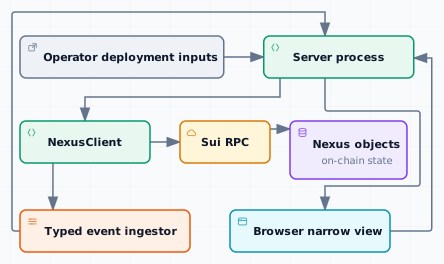
<figure><picture><source srcset="/files/ZkHdpivtz5zpzYK7oZe9" media="(prefers-color-scheme: dark)"><img src="https://2322144477-files.gitbook.io/~/files/v0/b/gitbook-x-prod.appspot.com/o/spaces%2FlV9L0m4FfiDv8fzxk6cT%2Fuploads%2Fgit-blob-99a50a0a5211a41558cadd038d886484f29f7b28%2Ff20-sdk-query-monitor-light.svg?alt=media" alt="SDK query monitor and event invalidation"></picture><figcaption></figcaption></figure>

The architecture keeps RPC credentials, object decoding, event checkpoints, and any future signer inside the server; the browser receives only a deliberately narrow view.

<figure><picture><source srcset="/files/VMUDqxkpPok60I0lgRHy" media="(prefers-color-scheme: dark)"><img src="https://2322144477-files.gitbook.io/~/files/v0/b/gitbook-x-prod.appspot.com/o/spaces%2FlV9L0m4FfiDv8fzxk6cT%2Fuploads%2Fgit-blob-dec3f79b5cfda78a7e05135cd01e176809a204ba%2Fd45-setup-light.svg?alt=media" alt="Build a query-only monitor without signer authority"></picture><figcaption><p>Phase 1: Build a query-only monitor. Keyed facts: the Operator supplies the RPC URL and IDs; NexusClient performs typed read + decode against read-only NexusObjects.</p></figcaption></figure>

<figure><picture><source srcset="/files/PnDC3UdbhCRdNbgfKkhm" media="(prefers-color-scheme: dark)"><img src="https://2322144477-files.gitbook.io/~/files/v0/b/gitbook-x-prod.appspot.com/o/spaces%2FlV9L0m4FfiDv8fzxk6cT%2Fuploads%2Fgit-blob-e48790d217867e30a690f3f624c12244f9da6536%2Fd45-typed-read-light.svg?alt=media" alt="NexusClient reads typed chain state and returns errors"></picture><figcaption><p>Phase 2: Read typed chain state and return result variants. Keyed facts: NexusClient reads typed NexusObjects and returns loaded, absent, unreadable, or invalid-ID results to the query-only server as a narrow HTTP response.</p></figcaption></figure>

<figure><picture><source srcset="/files/gF7wp9yZEIepwGIvaX0W" media="(prefers-color-scheme: dark)"><img src="https://2322144477-files.gitbook.io/~/files/v0/b/gitbook-x-prod.appspot.com/o/spaces%2FlV9L0m4FfiDv8fzxk6cT%2Fuploads%2Fgit-blob-7f6fcf287f751893cb60a22eb4af5428454d80b5%2Fd45-browser-poll-light.svg?alt=media" alt="Browser polling triggers authoritative readback"></picture><figcaption><p>Phase 3: Poll browser status and read authoritative state. Keyed facts: the query-only server returns a Browser-ready view to Browser UI; the browser polls status or awaits invalidation while the server reads authoritative state.</p></figcaption></figure>

The browser owns presentation. The server owns its configured client, event consumer, and authorization policy. Nexus owns protocol validation and durable state. Events make the UI timely, but the relevant object read after a write or retry is the correctness check.

Optional writes remain a separate backend-held signer and gas service; the browser never receives either one.

#### 1. Establish the deployment boundary

Choose one network and configure the client with its RPC endpoint and authenticated `NexusObjects`. Use the [NexusClient construction reference](/reference/sdk/client.md) for exact APIs. Render the selected network and a clear unsupported-network state before showing an empty object view.

The runnable fixture reads `NEXUS_OBJECTS_JSON` as a serialized, authenticated `NexusObjects` value and `NEXUS_EVENT_SOURCE` as the exact object address used to scope event ingestion. Obtain both from authenticated deployment evidence; do not invent IDs, versions, or digests. Verify them against the provider's deployment record, [Vision Deployment](/guides/vision-explorer/deployment.md), and a direct Sui object read. A mismatch means stop and fix configuration; do not send a transaction against guessed object IDs. `NEXUS_NETWORK` and `NEXUS_DEPLOYMENT` are operator-supplied display labels returned by `/api/status`; they identify the selected configuration for the UI but are not on-chain proof of network or package compatibility.

**Query-only server boundary**

Create the client only in the server process. Use the published SDK dependency in the example. If source inspection is needed, use the public SDK repository directly at the selected revision; the runnable example remains independent of that source directory:

```
query-monitor/
├── Cargo.toml
├── src/main.rs
└── static/index.html
```

The consumer dependency is resolved from crates.io, so the example does not depend on a sibling source tree:

```toml
[dependencies]
anyhow = "1"
nexus-sdk = { version = "=2.1.1", features = ["nexus"] }
async-trait = "0.1"
axum = "0.8"
serde = { version = "1", features = ["derive"] }
serde_json = "1"
tokio = { version = "1", features = ["io-util", "macros", "net", "rt-multi-thread", "signal", "sync", "time"] }
tokio-util = { version = "0.7", features = ["rt"] }
tower = { version = "0.5", features = ["util"] }
tonic = "0.14.6"
```

The published example is the exact [Cargo manifest](https://github.com/Talus-Network/nexus-docs/tree/v2.1.1/guides/sdk/examples/query-monitor/Cargo.toml), [lockfile](https://github.com/Talus-Network/nexus-docs/tree/v2.1.1/guides/sdk/examples/query-monitor/Cargo.lock), [server](https://github.com/Talus-Network/nexus-docs/tree/v2.1.1/guides/sdk/examples/query-monitor/src/main.rs), and [browser asset](https://github.com/Talus-Network/nexus-docs/tree/v2.1.1/guides/sdk/examples/query-monitor/static/index.html) shown by this guide. This read-only example pins the published `2.1.1` SDK crate and includes a matching lockfile; no host-specific path is required.

The client construction in `src/main.rs` is:

```rust
use {anyhow::Result, nexus_sdk::{nexus::client::NexusClient, types::NexusObjects}};

pub async fn build_client(nexus_objects: NexusObjects, rpc_url: &str) -> Result<NexusClient> {
    Ok(NexusClient::builder()
        .with_rpc_url(rpc_url)
        .with_nexus_objects(nexus_objects)
        .build()
        .await?)
}
```

This builder has no private key or gas source. Add those only in a separate backend action service before calling a write API such as `submit_transaction`, and never serialize signing material into the browser response.

#### 2. Build one authoritative typed read

Start with a public object such as an Agent, DAG, Tool, Task, or execution. Keep the identifier in the route, issue the SDK Crawler read on the server, and render loading, found, absent, and unreadable as distinct states. Do not collapse an RPC or BCS decoding error into “not found.”

The fixture calls the SDK's optional typed read for `DAGExecution` and projects only object metadata into its narrow response:

```rust
let response = client
    .crawler()
    .get_optional_object::<DAGExecution>(object_id)
    .await?;
let execution = response.map(|object| ExecutionView {
    object_id: object.object_id.to_string(),
    version: object.version,
    digest: object.digest.to_string(),
});
```

`get_optional_object` returns `Ok(None)` for an absent object and an error for transport or BCS decoding failures, so the application can distinguish `absent` from `unreadable`. The fixture's `/api/object/<id>` route returns `loaded`, `absent`, `unreadable`, or `invalid-id` and never exposes a raw BCS decoder or arbitrary RPC proxy to the browser.

**Verify:** open the same object in [Vision Search](/guides/vision-explorer/search.md), run `sui client object <OBJECT_ID> --json`, and compare the identity, version, and digest with the monitor response on the selected network.

#### 3. Add supervised activity without trusting stale data

Create the typed Nexus event ingestor from the same client. Persist the last successfully observed checkpoint and resume from it inclusively. Events are transient notifications; the typed object read remains authoritative.

The fixture’s event setup is:

```rust
let from_checkpoint = CheckpointStore::new(&checkpoint_path).load()?;
let receiver = client
    .event_ingestor(filter_source)
    .await
    .map_err(|error| EventIngestionError::Configuration(error.to_string()))?
    .with_channel_capacity(32)
    .with_cancellation_token(cancellation.clone())
    .with_replay_gap_recovery()
    .start(from_checkpoint)?;
```

Consume the fixture's mapped `MonitorEventReceiver` in a supervised task; the SDK source receiver is mapped at the boundary so the browser never depends on a generated event enum. For each page, process all candidates, persist the checkpoint monotonically, and reset the retry attempt only after that page has completed successfully; merely opening a receiver does not reset backoff. The fixture converts SDK `EventIngestionError` values into its own `MonitorError { kind, message }` record so the browser receives a stable local classification without inventing SDK variants. Configuration, decode, stream-protocol, and checkpoint-persistence failures are terminal. RPC transport is retryable only for the SDK's selected tonic codes `Cancelled`, `Unknown`, `DeadlineExceeded`, `ResourceExhausted`, `Aborted`, `Internal`, and `Unavailable`; `InvalidArgument`, `NotFound`, `PermissionDenied`, `Unauthenticated`, `FailedPrecondition`, `OutOfRange`, `Unimplemented`, and other non-selected codes are terminal. A `ReplayGap` is emitted visibly and, with the SDK recovery option enabled, the ingestor resumes from the live cursor; the fixture keeps consuming the next page rather than treating the gap as proof that the object state changed. A closed stream or retryable in-stream RPC exits the receiver loop and re-enters the supervisor's bounded backoff path.

The supervisor copies the page source into the serialized monitor status before processing candidates. The browser can therefore label the latest evidence as `replay` during historical recovery or `live` after the subscription resumes; neither label replaces authoritative object and transaction readback.

```rust
while let Some(page) = receiver.recv().await {
    match page {
        Ok(EventPage {
            checkpoint,
            events,
            source,
        }) => {
            app.mark_connected().await;
            app.mark_event_source(source).await;
            for candidate in events {
                match candidate {
                    MonitorEvent::Supported => app.mark_invalidation(checkpoint).await,
                    MonitorEvent::Unsupported(candidate) => {
                        app.mark_unsupported(candidate.to_string()).await;
                    }
                }
            }
            if let Err(error) = checkpoint_store.persist_monotonic(checkpoint) {
                app.mark_terminal(MonitorError::persistence(format!(
                    "checkpoint persistence failed: {error}"
                )))
                .await;
                return;
            } else {
                app.mark_checkpoint(checkpoint).await;
            }
        }
        Err(error) => {
            let classified = MonitorError::from_ingestion(&error);
            if classified.kind.is_retryable() {
                app.mark_error(classified).await;
                if matches!(error, EventIngestionError::ReplayGap { .. }) {
                    continue;
                }
                break;
            }
            app.mark_terminal(classified).await;
            return;
        }
    }
}
```

When a retryable error closes the receiver, arrives in-stream, or interrupts `start`, the supervisor waits with bounded exponential backoff: 250 ms, 500 ms, 1 s, and so on up to 8 s, with only a bounded jitter addition. Only a successfully processed page resets the attempt counter. This prevents a persistent selected-retryable RPC failure or repeated receiver closure from becoming a 10 ms hot loop while keeping protocol, permanent RPC, configuration, and decode failures terminal until an operator fixes the selected deployment or SDK boundary.

If streaming disconnects or the channel closes, show that live updates are paused, retain the last authoritative read and checkpoint, and reconnect using the saved cursor. Cancellation is explicit: the fixture passes a `CancellationToken` to both the ingestor and consumer and records the cancellation state before stopping. Never invent a state transition from a missing event.

The [event reference](/reference/sdk/events.md) defines the exact receiver, page, error, replay, cancellation, and unsupported-candidate signatures. The [SDK integration reference](/reference/sdk/integration.md) explains the direct client, transaction, custody, and application boundary.

#### 4. Expose only a narrow HTTP view

The fixture serves three routes: `/` for the browser asset, `/api/status` for stream health/checkpoint state, and `/api/object/<id>` for a refresh signal associated with one object ID. The server never accepts a private key, gas coin, arbitrary transaction, or arbitrary BCS type from the browser.

The browser fetches `/api/status`, renders connected/degraded states, polls as a fallback, and listens for a `nexus-monitor-invalidate` event before fetching again. A notification triggers a fresh server read; it does not replace the read result. Keep browser code in `static/index.html` and keep signing code out of that directory.

#### 5. Optional writes are a separate service

Choose one domain action from the generated [workflow](/reference/sdk/actions-workflow.md), [scheduler](/reference/sdk/actions-scheduler.md), [tool](/reference/sdk/actions-tool.md), or [TAP](/reference/sdk/actions-tap.md) reference only after adding a backend-held Ed25519 key, an explicit authorization check, and a documented gas source. A browser wallet approval flow is absent until the SDK supplies a public adapter.

**Verify:** show the transaction result separately from the final object state. Acceptance by Sui does not mean every later lifecycle step is complete: for example, a run first creates a Task, then an eligible occurrence is dispatched before an execution exists.

At the HTTP boundary, require an application authorization check before calling the action facade, return a transaction digest/effects summary, and enqueue an authoritative readback. Do not expose a generic “submit arbitrary Nexus transaction” endpoint to the browser.

#### 6. Run and verify the fixture

Run the published fixture from its example directory. When source-level comparison is required, clone the public SDK repository and record the selected revision instead of relying on an unpinned source directory. Keep its local `MonitorError`/retry abstraction at the application boundary so it does not invent an SDK error variant. The locked fixture contains crates.io registry dependencies and pinned Git `move-binding` dependencies, so `--locked` prevents version/lock drift but does not make dependency acquisition network-free. Use caller-selected writable cache and target directories when the defaults are unavailable:

```bash
NEXUS_SDK_DIR="${NEXUS_SDK_DIR:-sdk-source}"
git clone https://github.com/Talus-Network/nexus-sdk.git "$NEXUS_SDK_DIR"
git -C "$NEXUS_SDK_DIR" checkout 08bfe76e726922ce512d623fbc1d2e1bd786bcd4
```

```bash
cd examples/query-monitor
CARGO_CACHE_DIR="${CARGO_CACHE_DIR:-.cargo-cache}"
CARGO_TARGET_DIR="${CARGO_TARGET_DIR:-.cargo-target}"
mkdir -p "$CARGO_CACHE_DIR" "$CARGO_TARGET_DIR"
CARGO_HOME="$CARGO_CACHE_DIR" CARGO_TARGET_DIR="$CARGO_TARGET_DIR" cargo check --locked
CARGO_HOME="$CARGO_CACHE_DIR" CARGO_TARGET_DIR="$CARGO_TARGET_DIR" cargo test --locked
```

The compile and unit-test gates make no Nexus deployment calls, but Cargo may contact crates.io or the pinned Git dependency while acquiring missing bytes. Prefetch the locked dependency set when network access is available, then use offline mode only from that warmed cache:

```bash
CARGO_CACHE_DIR="${CARGO_CACHE_DIR:-.cargo-cache}"
CARGO_TARGET_DIR="${CARGO_TARGET_DIR:-.cargo-target}"
mkdir -p "$CARGO_CACHE_DIR" "$CARGO_TARGET_DIR"
CARGO_HOME="$CARGO_CACHE_DIR" cargo fetch --locked
CARGO_HOME="$CARGO_CACHE_DIR" CARGO_NET_OFFLINE=true CARGO_TARGET_DIR="$CARGO_TARGET_DIR" cargo check --locked
CARGO_HOME="$CARGO_CACHE_DIR" CARGO_NET_OFFLINE=true CARGO_TARGET_DIR="$CARGO_TARGET_DIR" cargo test --locked
```

If `cargo fetch --locked` or either offline command reports a missing registry/Git dependency, the cache is incomplete; rerun the fetch with network access or report the earliest dependency-acquisition blocker rather than claiming the test is network-free. To run the server against a selected deployment, provide the operator-supplied values:

```bash
SUI_RPC_URL='https://<selected-grpc-endpoint>' \
NEXUS_NETWORK='<selected-network-label>' \
NEXUS_DEPLOYMENT='<selected-deployment-label>' \
NEXUS_OBJECTS_JSON='<serialized-nexus-objects>' \
NEXUS_EVENT_SOURCE='<event-source-object-id>' \
NEXUS_MONITOR_BIND='127.0.0.1:8787' \
NEXUS_MONITOR_CHECKPOINT='./monitor.checkpoint' \
cargo run --release
```

Open `http://127.0.0.1:8787/`, confirm `/api/status` reports the configured stream plus the selected network/deployment labels, then compare the object read with [Vision Search](/guides/vision-explorer/search.md) and `sui client object <OBJECT_ID> --json` on the same network. The fixture marks the stream connected when its receiver starts; it becomes authoritative only after an object read. If the endpoint is unavailable, the object bindings are stale, or a replay gap is reported, preserve the last read, show the degraded state, and fix configuration or reconnect. A successful page clears a retryable degraded state and preserves the monotonic checkpoint.

#### Completion checklist

* The UI shows the operator-supplied selected network and deployment labels, clearly as configuration metadata rather than chain proof.
* The server uses injected, authenticated `NexusObjects` and a query-only `NexusClient`; it does not infer or refresh configuration from a Protocol object.
* A typed object read distinguishes absent, unreadable, and loaded state.
* The supervised event consumer persists a monotonic checkpoint, handles cancellation/channel closure/errors, applies the SDK retry-status matrix, and treats protocol/permanent RPC failures as terminal while unsupported candidates remain classifications.
* Events refresh or invalidate data but cannot overwrite a newer authoritative read.
* The HTTP surface exposes only `/`, `/api/status`, and `/api/object/<id>`; no browser signer, gas source, BCS decoder, or arbitrary transaction endpoint exists.
* A write, if added later, requires explicit server-side authorization, signer policy, gas configuration, transaction effects, and a fresh readback.
* The final state is verified by a fresh SDK read, Vision Explorer, and an independent direct Sui object read.

Next: follow [Execute and Settle an Agent](/guides/agent-usage/execute-and-settle-agent.md) for the Agent → DAG → skill → Task → execution flow, or consult the [SDK integration reference](/reference/sdk/integration.md) for the direct client surface.


---

# Agent Instructions
This documentation is published with GitBook. GitBook is the documentation platform designed so that both humans and AI agents can read, navigate, and reason over technical content effectively. Learn more at gitbook.com.

## Querying This Documentation
If you need additional information that is not directly available in this page, you can query the documentation dynamically by asking a question.

Perform an HTTP GET request on the following URL with the `ask` and `goal` query parameters:

```
GET https://docs.talus.network/guides/sdk/build-a-query-monitor.md?ask=<question>&goal=<user_goal>
```

`ask` is the immediate question: it should be specific, self-contained, and written in natural language.
`goal` is what the user is ultimately trying to achieve, the reason they need the answer. Sharing it helps GitBook give you a better, more relevant answer. A goal is most helpful when it describes the outcome the user wants rather than restating the question. For example, with `ask=how do I create an API token`, a goal like `build a script that syncs our docs to a CMS` lets GitBook tailor the answer to that use case.

The response will contain a direct answer to the question and relevant excerpts and sources from the documentation.

Use this mechanism when the answer is not explicitly present in the current page, you need clarification or additional context, or you want to retrieve related documentation sections.
