> For the complete documentation index, see [llms.txt](https://docs.talus.network/llms.txt). Markdown versions of documentation pages are available by appending `.md` to page URLs; this page is available as [Markdown](https://docs.talus.network/guides/vision-explorer/checking-tools.md).

# Checking Vision Tools

{% hint style="info" %}
**Audience:** Workflow builders vetting a tool before dragging it onto a canvas; tool owners watching their earnings from the outside.

**Goal:** Read the tool directory and a single tool's page — price, timeout, schemas, collateral, policy offers, and completed Invocation economy.
{% endhint %}

### The directory

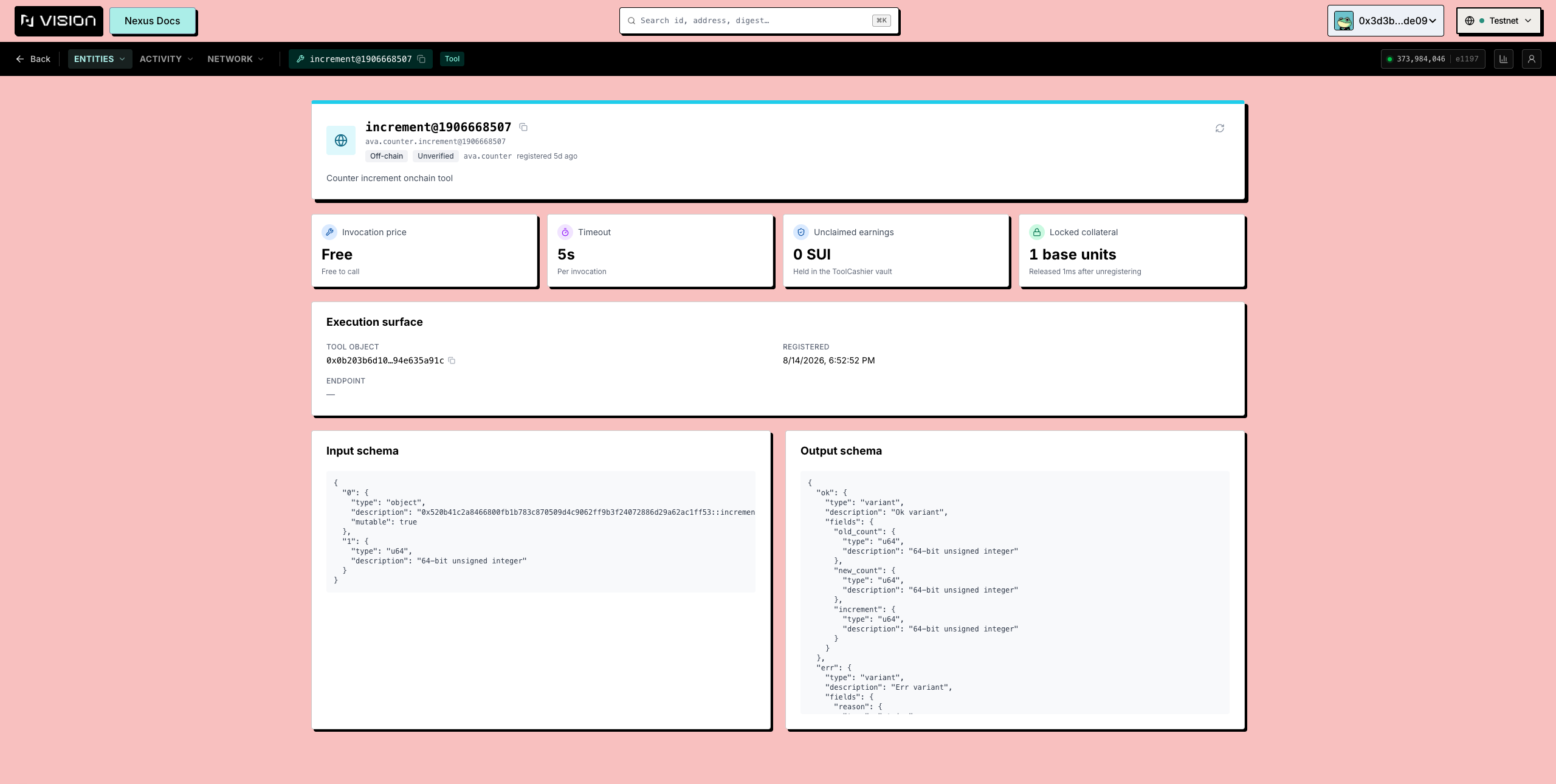
**Entities → Tools** enumerates the live `registry.tool_ids` directory, then searches, filters, and sorts client-side over that set. Retired or unregistered records are removed from the live directory and are not guaranteed to appear there. "No matches" therefore means no live registration matches; a retired FQN is available only if the provider separately retains a historical/archive projection or you already know its object ID. The retained Vision snapshot records a cold Testnet load of roughly 25–30 seconds for four paced reads per Tool — identity, price, timeout, and earnings — but that is historical UI evidence, not a service or protocol timing guarantee. Wait for directory readback and use [Troubleshooting](/faq/08-troubleshooting.md) when reads fail or remain incomplete.

* **Stat cards** — **Registered tools**, **Verified**, **Avg invocation price** (unknown prices stay out of the average), **Unclaimed earnings** across the registry.
* **Search** — FQN, description, URL, or package.
* **Filter by kind** — **Off-chain** / **On-chain**; use any status filter only over statuses present in the provider's live or explicitly archived projection; a **Verified** toggle for tools verified by the slashing authority.
* **Sort** — **Name**, **Newest**, **Price**, **Earnings**. Unknown prices sort *last* under Price, never among the free ones.

Each row: FQN, kind badge, verified badge, **invocation price** (SUI, **Free**, or **Unknown**), **timeout**, earnings, and registration state.

> **When Vision omits this panel:** Inspect accepted policies and completed accounting through matching CLI/SDK bindings and transaction effects. The displayed **Free** price label means a FixedPrice of exactly zero; it is not a separate protocol policy. FiniteCredits and TimePass point to entitlement objects, Custom policies are named by type identity, and completed Invocations remain tied to their execution and runtime vertex until the Tool owner collects them through a policy-homogeneous batch.

<figure><img src="https://2322144477-files.gitbook.io/~/files/v0/b/gitbook-x-prod.appspot.com/o/spaces%2FlV9L0m4FfiDv8fzxk6cT%2Fuploads%2Fgit-blob-d8c62eff6ba9f339cbd8486ff48e754ba4e4be2f%2Fexplorer-tools-list.png?alt=media" alt="The Tools directory with stat cards, facet chips and sort menu"><figcaption><p>The Tools directory: the whole registry, with facets for kind and status, and a sort that keeps unknown prices away from the free ones.</p></figcaption></figure>

#### The tool page

`/explorer/tool/<fqn>` is routed by the FQN lookup handle. The selected ToolRegistry derives the stable Tool object ID from its registry UID and that FQN; the FQN is therefore registry-scoped, not a global identity. It is the value you copy out of a DAG, a README, or the CLI.

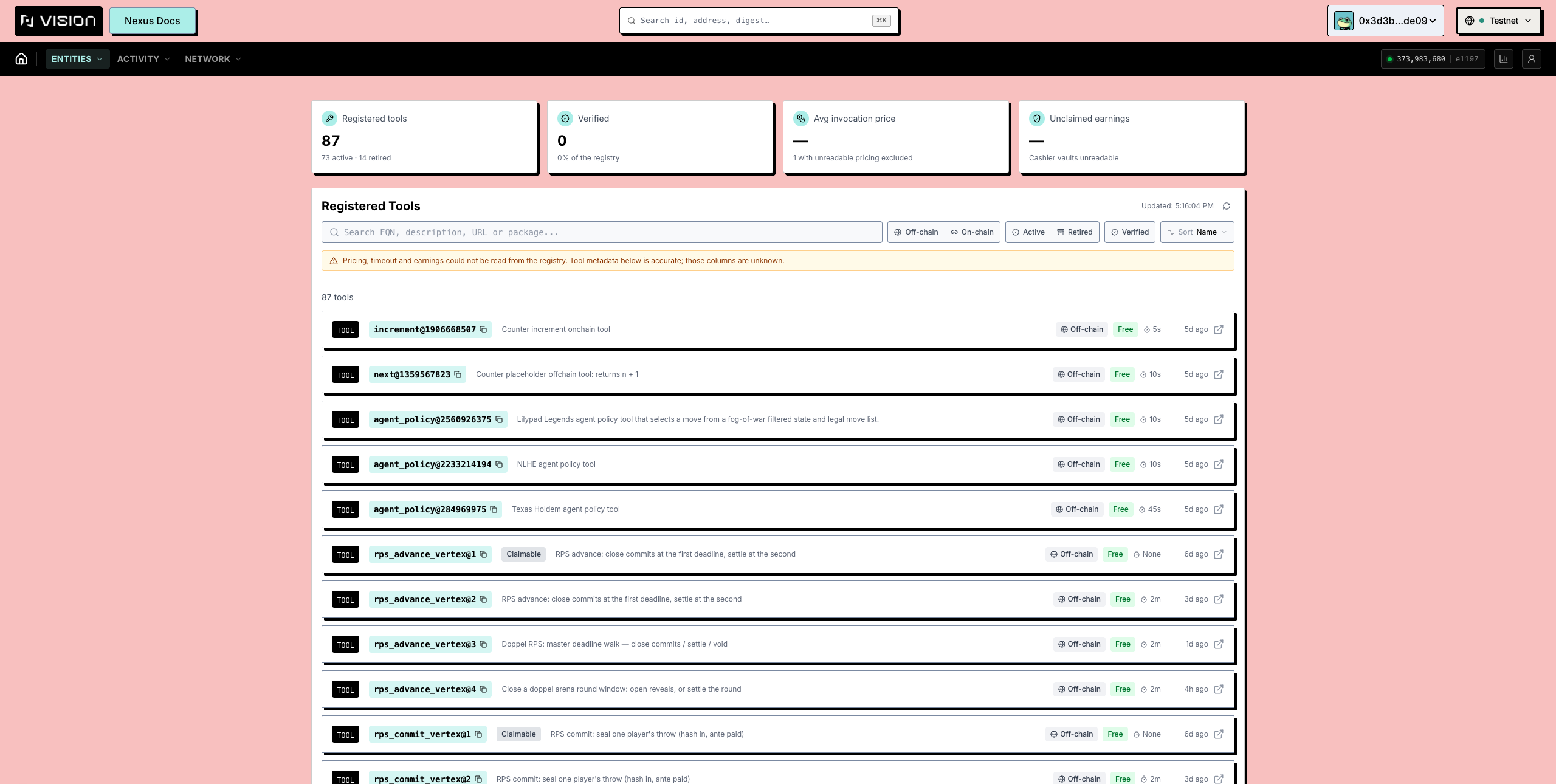
* **Identity** — FQN (copyable), **Tool object** id, **Registered** / **Unregistered** times, verified flag.
* **Execution surface** — for an off-chain tool the **Endpoint**; for an on-chain tool the **Move package**, **Module**, and **Witness**.
* **Invocation price**, **Timeout**, **Unclaimed earnings** as stat cards. Each reads **Unknown** individually if its own read failed — never because some *other* tool's read did.
* **Locked collateral** (`$US`) and its state: **active**, **cooling-down** (unregistered, the lock still running), **claimable** (the lock has elapsed), or **retired**. The first two are kept apart because they answer the only question a retired tool's owner has.
* **Input schema** and **Output schema** — the ports as **Field** / **Type** / **Required** tables, so you can see exactly what the tool expects and returns before building on it.

<figure><img src="https://2322144477-files.gitbook.io/~/files/v0/b/gitbook-x-prod.appspot.com/o/spaces%2FlV9L0m4FfiDv8fzxk6cT%2Fuploads%2Fgit-blob-eb566d78b804248dd59f0205acd4de123d59ad13%2Fexplorer-tool-detail.png?alt=media" alt="A tool page with price, timeout, collateral and port schemas"><figcaption><p>A tool page: price, timeout, and earnings as separate reads, with the port schemas below.</p></figcaption></figure>

#### What to check before using a tool

1. **The price** — it is charged per invocation, per run. A retained UI estimate based on listed prices is not an accounting formula or funding guarantee. Use the signed `occurrence_budget_mist` and on-chain gas/priority split from [Payment Vaults, Reserves, and Settlement](/concepts/06-payment-vaults-reserves-and-settlement.md) as authoritative.
2. **The timeout** — the Tool page’s configured timeout is not by itself the abort boundary. When the active DAG walk is created or advanced, the runtime captures a `timeout_ms` snapshot from the Tool configuration; the five-second leader-evaluation buffer and `2 × (captured timeout + 5 seconds)` window apply to that stored walk value. A later Tool timeout update does not rewrite an existing walk. Use execution/walk readback and transaction effects, not the Tool-directory card at inspection time.
3. **The schemas** — do the output variants carry what your next vertex needs?
4. **Verified and collateral** — a verified badge and live collateral are registry governance and economic signals, not result truth; inspect the selected verifier mode and its evidence in [Verifiers and Result Trust](/concepts/04-verifiers-and-result-trust.md). A retired or cooling-down tool is on its way out.

#### Registering and managing your own

Everything write-side — registering an off-chain or on-chain Tool, the signing-key step, price/timeout/URL updates, unregistering, and collateral — uses wallet-authorized CLI or SDK paths documented in [Tool Development](/guides/tool-development.md). Claiming earnings is disabled in the retained Vision build; the figure on this page is read-only either way.


---

# Agent Instructions
This documentation is published with GitBook. GitBook is the documentation platform designed so that both humans and AI agents can read, navigate, and reason over technical content effectively. Learn more at gitbook.com.

## Querying This Documentation
If you need additional information that is not directly available in this page, you can query the documentation dynamically by asking a question.

Perform an HTTP GET request on the following URL with the `ask` and `goal` query parameters:

```
GET https://docs.talus.network/guides/vision-explorer/checking-tools.md?ask=<question>&goal=<user_goal>
```

`ask` is the immediate question: it should be specific, self-contained, and written in natural language.
`goal` is what the user is ultimately trying to achieve, the reason they need the answer. Sharing it helps GitBook give you a better, more relevant answer. A goal is most helpful when it describes the outcome the user wants rather than restating the question. For example, with `ask=how do I create an API token`, a goal like `build a script that syncs our docs to a CMS` lets GitBook tailor the answer to that use case.

The response will contain a direct answer to the question and relevant excerpts and sources from the documentation.

Use this mechanism when the answer is not explicitly present in the current page, you need clarification or additional context, or you want to retrieve related documentation sections.