> For the complete documentation index, see [llms.txt](https://docs.talus.network/llms.txt). Markdown versions of documentation pages are available by appending `.md` to page URLs; this page is available as [Markdown](https://docs.talus.network/guides/vision-explorer/deployment.md).

# Vision Deployment

{% hint style="info" %}
**Audience:** Vision users and integrators checking which hosted network and public package/object identities the Explorer is reading.

**Goal:** Read the hosted Deployment view, distinguish a matching network from drift or unavailable data, and avoid treating a UI snapshot as mutation authority.
{% endhint %}

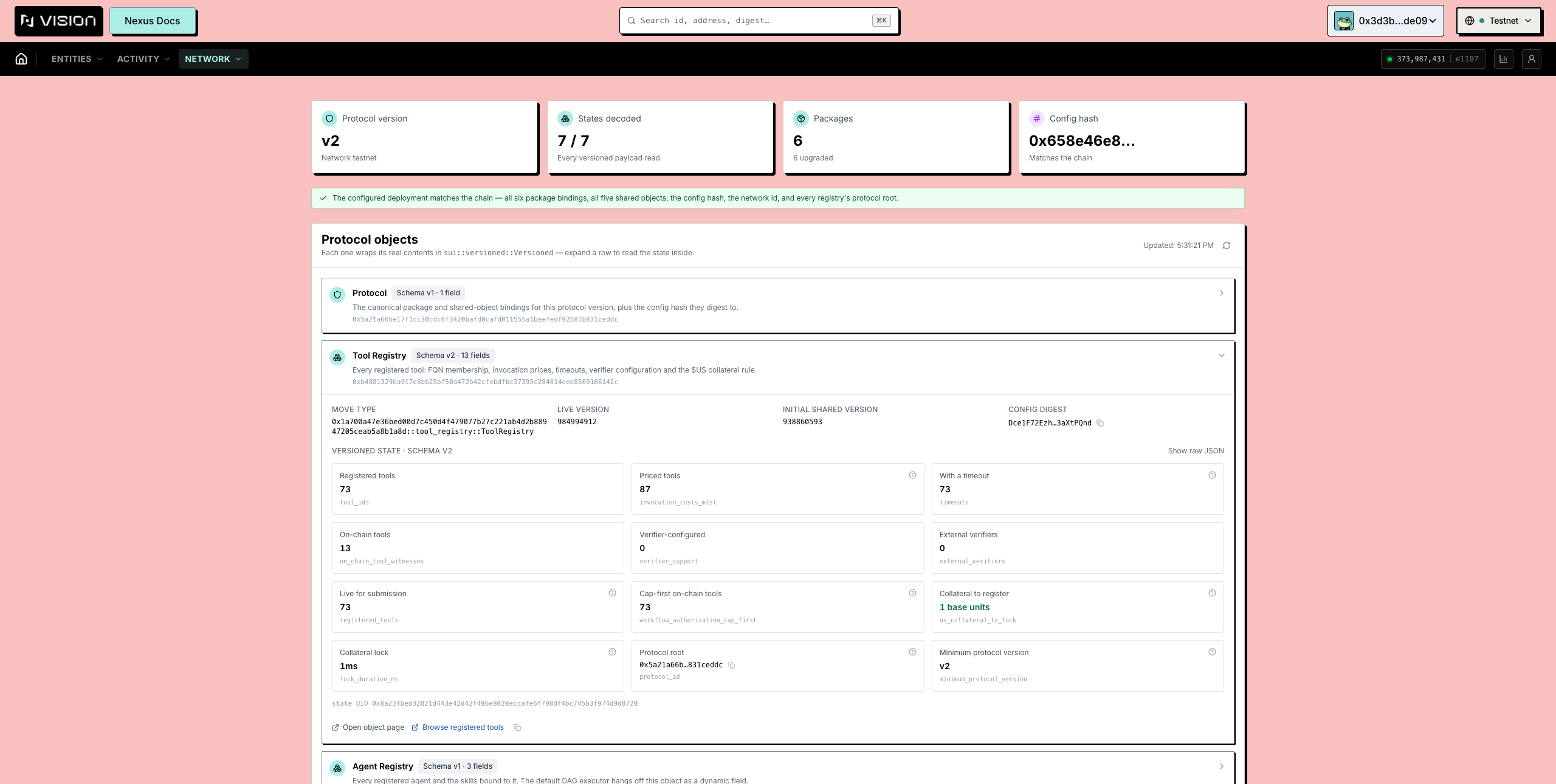
The Vision Deployment view is a read-only consumer feature. The provisional destination [vision.talus.network](https://vision.talus.network) is retained for a later release and is not a claim that the hosted service is live. The page reads the selected network’s public deployment document and compares visible package, immutable-kernel, shared-root, capability, and network identities with state it can read.

The architecture figure keeps the hosted boundary clear: users can inspect public network evidence, but the Deployment view does not grant package upgrade, runtime, or object mutation authority.

The sequence distinguishes a read comparison from a transaction flow. A missing or unavailable read is not agreement, and a matching row is not proof that a consumer can mutate the object.

### Public fields

* **Network and chain** show the deployment’s network label, `chain_id`, and on-chain `network_id`.
* **Kernel** shows the immutable kernel package and its publication/immutability transaction evidence.
* **Packages** show the six public package lineages with initial id, storage id, version, UpgradeCap, dependency linkage, publication digest, and comparison state.
* **Shared roots** show ToolRegistry, NetworkAuth, AgentRegistry, LeaderRegistry, priority-fee vault, and RuntimeAuthority object ids with initial shared versions.
* **Capabilities** show the public administrative and runtime capability object ids recorded by the environment artifact.
* **Token metadata** shows the configured external `$US` package, module, type, treasury cap, and coin metadata when the deployment exposes them.
* **Transactions** show package publication and deployment transaction evidence carried by the selected document.
* **Decoded count** distinguishes successfully read rows from unavailable or structurally empty rows.
* **Search** can open a singleton row by id; wrapped objects are resolved through the public owner view when the hosted reader supports that relationship.

<figure><img src="https://2322144477-files.gitbook.io/~/files/v0/b/gitbook-x-prod.appspot.com/o/spaces%2FlV9L0m4FfiDv8fzxk6cT%2Fuploads%2Fgit-blob-c031475e17b12bc0f4ce1bf8c4a18e0ffb89b92f%2Fexplorer-deployment.png?alt=media" alt="The Deployment page with protocol objects and their decoded state"><figcaption><p>The Deployment page: public package and object identities are compared with the selected network state. The captured UI is evidence of the feature shape, not a live-service guarantee.</p></figcaption></figure>

#### Drift states

| Visible state         | Meaning                                                                         | Consumer action                                                                       |
| --------------------- | ------------------------------------------------------------------------------- | ------------------------------------------------------------------------------------- |
| **Matches the chain** | Every public binding the document carries agrees with the selected network read | Continue inspecting the relevant Explorer page and transaction effects                |
| **N field(s) differ** | The document and selected network expose different public values                | Re-select the intended network or ask the service provider for a valid deployment URL |
| **Not compared**      | A public read failed or the active configuration is unset                       | Treat the result as unavailable, not empty or healthy                                 |

The page can also compare package linkage, object id, initial shared version, network id, witness type, and owner-cap references when those values are present. Deployment records explicitly omit `protocol`, `protocol_version`, and `config_hash`. The view does not expose private service configuration, deployment commands, process health, or mutation instructions.

#### Availability boundary

The retained screenshots and provisional URL do not prove a live service. Use the hosted URL and selected network published by the provider, and rely only on fields visible in the selected build. Historical Protocol rows in the screenshot are not deployment-manifest or effect-authority evidence. When Vision omits RuntimeAuthority or Invocation fields, inspect them through matching CLI/SDK bindings, package IDs, objects, and transaction effects.

#### Next

Use the [Talus Vision Explorer Guide](/guides/vision-explorer.md) for the Explorer map. When you need to create state, use a wallet-authorized [CLI](/reference/cli.md) or [SDK](/reference/sdk.md) flow and return here for independent readback.


---

# Agent Instructions
This documentation is published with GitBook. GitBook is the documentation platform designed so that both humans and AI agents can read, navigate, and reason over technical content effectively. Learn more at gitbook.com.

## Querying This Documentation
If you need additional information that is not directly available in this page, you can query the documentation dynamically by asking a question.

Perform an HTTP GET request on the following URL with the `ask` and `goal` query parameters:

```
GET https://docs.talus.network/guides/vision-explorer/deployment.md?ask=<question>&goal=<user_goal>
```

`ask` is the immediate question: it should be specific, self-contained, and written in natural language.
`goal` is what the user is ultimately trying to achieve, the reason they need the answer. Sharing it helps GitBook give you a better, more relevant answer. A goal is most helpful when it describes the outcome the user wants rather than restating the question. For example, with `ask=how do I create an API token`, a goal like `build a script that syncs our docs to a CMS` lets GitBook tailor the answer to that use case.

The response will contain a direct answer to the question and relevant excerpts and sources from the documentation.

Use this mechanism when the answer is not explicitly present in the current page, you need clarification or additional context, or you want to retrieve related documentation sections.
