> For the complete documentation index, see [llms.txt](https://docs.talus.network/llms.txt). Markdown versions of documentation pages are available by appending `.md` to page URLs; this page is available as [Markdown](https://docs.talus.network/talus-docs-v2.1.0/concepts/04-verifiers-and-result-trust.md).
# Tool Result Verifiers
{% hint style="info" %}
**Audience:** Tool developers, Agent developers, and integrators.
**Goal:** Choose a result-trust mode and distinguish transport success from on-chain acceptance.
{% endhint %}
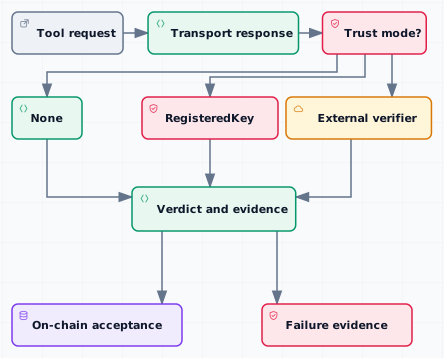
A verifier answers a narrow question: what evidence is sufficient for one Tool result to become accepted workflow data? Transport success means a request reached a Tool and produced a response; on-chain acceptance means the protocol checked the configured trust choice and committed the result.
### The three trust choices
* **`None`** accepts the configured no-verifier path. It does not turn an unreachable endpoint into a successful result; a terminal off-chain transport failure may become normalized `_err_eval` failure evidence on this path, while the workflow still records the response or failure boundary.
* **`RegisteredKey`** accepts evidence signed by an active key binding for the Tool or Leader identity. Key lifecycle, canonical commitments, and Signed HTTP are owned by [Registered Keys and Signed Tool Communication](/talus-docs-v2.1.0/concepts/10-registered-keys-and-signed-tool-communication.md).
* **`External`** routes evidence to the Tool’s registered external verifier configuration, including its method, witness, and required shared objects. Use the generated [external verifier reference](/talus-docs-v2.1.0/reference/move/nexus_tool/external_verifier.md) for exact fields.
The selected mode is part of Tool and vertex configuration. Do not describe a RegisteredKey signature or external witness as a generic verifier requirement when the vertex selected `None`.
#### Verdicts and proof requirements
A verifier produces a verdict such as accepted, rejected, or a failure classification that the workflow can route. Proof requirements include the expected Tool identity, request commitment, signer or witness, nonce or replay boundary, and any required shared-object state. A returned or verifier-submitted output can produce durable `VerificationVerdict::Reject`/failure evidence, including an external-verifier rejection or an invalid active signature. A terminal off-chain transport failure may normalize to `_err_eval` evidence only for the `None` path; with `RegisteredKey` or `External`, verified transport failure can remain pending until timeout/expiry rather than becoming a cryptographic `Reject`. By contrast, a malformed proof, wrong Tool or vertex binding, stale request, missing witness, or structurally invalid stamp can abort the transaction before a result is committed; it leaves no failure evidence to resolve. Repair and resubmit that submission rather than treating an abort as a recoverable rejected result.
The workflow can therefore have a successful HTTP response with an on-chain rejection, a `None` transport failure with normalized `_err_eval` evidence, or a verified transport failure that waits for expiry. It can also have a transaction abort with no committed result at all. Payment and result-resolution use the accepted verdict or durable failure evidence, not an HTTP status alone.
#### Evidence boundary
Keep the generic verifier model here: identify the trust choice, the expected proof, and the verdict. Keep key rotation, allowlists, canonical signed bytes, nonce rules, and Signed HTTP v3 in [Registered Keys and Signed Tool Communication](/talus-docs-v2.1.0/concepts/10-registered-keys-and-signed-tool-communication.md). Keep the committed-result and affordability lifecycle in [On-Chain Result Resolution](/talus-docs-v2.1.0/concepts/11-onchain-result-resolution.md).
#### Verification checklist
1. Record the Tool identity and vertex that selected the verifier.
2. Confirm whether the mode is `None`, `RegisteredKey`, or `External`.
3. Preserve the request commitment and the proof or failure evidence.
4. Check the verdict on chain before treating transport success as workflow success.
5. Link exact fields and signatures to the generated Move and SDK references.
**Next**
Continue to [DAG and Execution](/talus-docs-v2.1.0/concepts/05-workflow-dag-execution.md) to see where a verdict enters execution state.
---
# Agent Instructions
This documentation is published with GitBook. GitBook is the documentation platform designed so that both humans and AI agents can read, navigate, and reason over technical content effectively. Learn more at gitbook.com.
## Querying This Documentation
If you need additional information that is not directly available in this page, you can query the documentation dynamically by asking a question.
Perform an HTTP GET request on the following URL with the `ask` and `goal` query parameters:
```
GET https://docs.talus.network/talus-docs-v2.1.0/concepts/04-verifiers-and-result-trust.md?ask=&goal=
```
`ask` is the immediate question: it should be specific, self-contained, and written in natural language.
`goal` is what the user is ultimately trying to achieve, the reason they need the answer. Sharing it helps GitBook give you a better, more relevant answer. A goal is most helpful when it describes the outcome the user wants rather than restating the question. For example, with `ask=how do I create an API token`, a goal like `build a script that syncs our docs to a CMS` lets GitBook tailor the answer to that use case.
The response will contain a direct answer to the question and relevant excerpts and sources from the documentation.
Use this mechanism when the answer is not explicitly present in the current page, you need clarification or additional context, or you want to retrieve related documentation sections.