> For the complete documentation index, see [llms.txt](https://docs.talus.network/llms.txt). Markdown versions of documentation pages are available by appending `.md` to page URLs; this page is available as [Markdown](https://docs.talus.network/talus-docs-v2.1.0/concepts/06-payment-vaults-reserves-and-settlement.md).
# Payment Vaults, Reserves, and Settlement
{% hint style="info" %}
**Audience:** Agent developers, Tool developers, and integrators.
**Goal:** Choose a funding source, understand reserves and locks, and verify that execution settlement is complete.
{% endhint %}
Payment answers three separate questions: who funds an execution, how much a Tool invocation may charge, and when the protocol releases or settles the reserved value. Sui transaction gas is a fourth meter paid by the submitting address or gas object.
### Agent-funded and user-funded execution
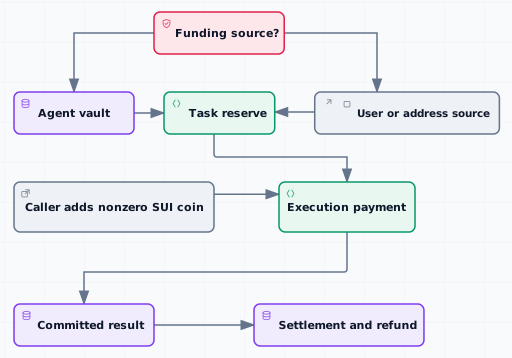
* **Agent-funded:** the Task reserves SUI from the Agent payment vault under the skill’s agent-funded budget.
* **User-funded:** the Task reserves SUI from the user or application-selected execution source.
The schedule and skill must use the matching funding policy. A reserve can cover future occurrences while an `ExecutionPayment` records the amount allocated to one dispatched execution. See [Fund Agent- and User-Paid Executions](/talus-docs-v2.1.0/guides/tokenomics/fund-agent-and-user-executions.md) for the task procedure.
#### Tool price and payment state
A Tool’s configured invocation price is snapshotted when the execution creates its payment state. Tool revenue, execution payment, and Sui transaction gas are different balances and should be inspected separately. The protocol records one exact policy-backed Invocation for each authorized Tool vertex and lets the ToolCashier owner collect completed Invocations or generic deposits. Inspect the Tool price, Invocation and lock/settlement receipts, payment effects, and collection receipts; collection does not withdraw an Agent’s execution reserve.
#### Invocation policy and settlement model
> **Before you sign:** Verify that the installed CLI/SDK bindings, configured package IDs and shared objects, and transaction effects agree with the selected network. A hosted projection may expose fewer fields, but that does not create a second protocol accounting model.
**Accepted policies and authority**
In the policy model, a ToolCashier owner accepts FixedPrice, FiniteCredits, TimePass, or a caller-supplied Custom policy. A zero-priced FixedPrice is the zero-cost case. The caller selects one accepted policy for one runtime vertex; when no caller lock exists, automatic selection tries zero-priced FixedPrice, then a usable TimePass, then usable finite credits, and finally FixedPrice. Custom is never selected automatically. Cashier configuration and collection use `CloneableOwnerCap`; Tool lifecycle and package-pointer custody use `CloneableOwnerCap`. Neither capability is a generic execution grant or registry endorsement authority.
**Exact identity and settlement order**
The caller’s selected policy creates one exact Invocation identity containing the Execution, vertex key, Tool and cashier IDs, payment beneficiary/source, policy terms, amount, and refund destination such as `refund_to`. The beneficiary must match the Execution payment source; a caller or leader that triggers the work does not rewrite that identity.
The ordering is: place the exact lock, execute and verify the Tool result, consume the matching settlement or refund receipt, charge or refund that Invocation, then settle the Execution and any separate Occurrence accounting. A timeout refund resolves the exact Invocation before workflow abort and any separate occurrence settlement. Unused ExecutionPayment returns through the recorded source/refund path; a refunded policy entitlement follows its own `refund_to` claim rules.
Refund recovery depends on the policy. FiniteCredits restores an eligible refunded Invocation to the canonical ToolCashier-and-beneficiary account through `nexus tool cashier finite-credits restore-refund --tool-fqn --invocation-id `; there is no split, join, or refund-manager API. TimePass is immutable and carries no refundable reserve, so use an active pass or another accepted policy. Generic or Custom reserve-carrying policies use their documented Move/SDK `claim_refund` path and have no universal CLI command; if that policy does not publish a safe claim path, stop and retain the refunded Invocation rather than inventing one.
If the installed client or selected network does not expose these exact objects or builders, stop at inspection and record the package/binding mismatch. The generated [Invocation reference](/talus-docs-v2.1.0/reference/move/nexus_tool/invocation.md) and [Tool cashier reference](/talus-docs-v2.1.0/reference/move/nexus_tool/tool_cashier.md) preserve the signatures and fields but do not by themselves prove that a particular network runs matching packages.
#### Locks and receipts
`ExecutionPaymentVertexLock` records `vertex_key`, `invocation_id`, and `amount`. It is the payment-side accounting line, not the full policy record. The corresponding `Invocation` and linear lock/settlement receipts bind the execution, vertex, Tool, cashier, beneficiary, policy, funding source, and refund outcome. Inspect the payment lock and exact Invocation together; if a hosted reader omits either view, use matching CLI/SDK bindings and transaction effects rather than inferring absent fields. See the generated [Invocation reference](/talus-docs-v2.1.0/reference/move/nexus_tool/invocation.md) and [On-Chain Result Resolution](/talus-docs-v2.1.0/concepts/11-onchain-result-resolution.md).
#### Diagnose a shortfall before refilling
| Observed state | What failed | Safe recovery |
| ---------------------------------------------------------------------------------------------------------------------------------------------------------------------------------------------- | ---------------------------------------------------------------------------------- | ---------------------------------------------------------------------------------------------------------------------------------------------------------------------------------------------------------------------------------------------------------------------------------------------------------- |
| Task/Occurrence inspection or dispatch effects prove a reserve/budget shortfall, and no Execution was created | `TaskPaymentReserve` cannot fund another occurrence | Run `nexus task refill --task-id --amount-mist `. For an Agent-controlled Task, the signer must control the recorded Agent and its vault must contain the amount. Do not diagnose reserve shortage from “no Execution” alone: permanent Task rejection also creates none. |
| The Execution is active, with no Invocation lock or committed result for that walk, and authorization aborts with `EPaymentBudgetExceeded` while accounting for verified-Leader submission gas | ExecutionPayment cannot cover the authorization-time reimbursement charge | Refill the live ExecutionPayment. The selected active Leader holding the exact Leader capability then retries `nexus execution authorize`; an ordinary wallet user does not acquire a Leader capability for this retry. The failed transaction left no persisted Invocation or payment lock for that walk. |
| The Execution is active, with no Invocation lock or committed result for that walk, and `payment::lock_invocation` aborts with `EPaymentBudgetExceeded` | ExecutionPayment cannot cover the snapshotted Tool amount | Refill the live ExecutionPayment, then retry the exact policy authorization. The failed transaction left no Invocation, lock, request event, or result for that walk. |
| The walk is `PendingSettlement`, with a committed result, Invocation lock, and insufficient-settlement marker | ExecutionPayment cannot cover the payable Leader settlement gas and priority delta | Refill the live ExecutionPayment, then run `nexus tap execution settle --execution-id --walk-index ` and verify the marker, committed result, and lock clear. Do not abort this walk. |
| The transaction never reaches Nexus because the submitting address or gas coin lacks SUI | Immediate Sui transaction gas is insufficient | Fund or select the submitting address/gas coin and retry the transaction. Refilling ExecutionPayment does not fund caller transaction gas. |
`ETransactionBudgetExceeded` means the proposed Leader charge exceeds the LeaderRegistry transaction-budget maximum; adding ExecutionPayment funds does not change that limit. `ENoCreditsRemaining` and `EPassNotActive` are policy-entitlement failures; restore or choose a valid policy resource instead of refilling ExecutionPayment.
Both authorization-time balance failures use `EPaymentBudgetExceeded`. Distinguish them with the failed transaction’s Move abort location and the historical amounts recorded for that Execution: read the Tool-price snapshot from `ExecutionPayment`/Invocation state and available base funds from `nexus tap payments show`. The price reported by `nexus tool inspect` is context only because a later Tool-price update does not rewrite the Execution snapshot. `payment::lock_invocation` identifies Tool-price shortage, while `consume_payment_for_verified_leader_submission` identifies the verified-Leader reimbursement shortage. If the selected client does not expose the abort location or historical snapshot, stop and report the diagnostic gap rather than guessing. A gas failure may occur after a transient lock is formed, but the failed transaction rolls that lock and every other authorization effect back.
For `ETransactionBudgetExceeded`, stop retrying the same charge and ask the network operator to compare it with the LeaderRegistry maximum; only an authorized registry configuration change or a lower valid charge can resolve it. For `ENoCreditsRemaining`, add to the canonical ToolCashier-and-beneficiary account through public purchase when issuance is open, owner-authorized issue, or exact refunded-Invocation restoration; otherwise choose another accepted policy. For `EPassNotActive`, use a TimePass whose immutable interval includes authorization time or select another accepted policy such as FixedPrice. A Custom policy has no universal refill action; follow that policy’s documented resource recovery and stop if none is public.
#### Settlement outcomes
* **Sufficient payment:** settle the committed result, remove the committed result when the walk can advance, and release or refund unused value according to the source.
* **Insufficient committed-result settlement:** retain the committed result, Invocation lock, and shortfall marker; any caller may add a nonzero SUI coin to the live `ExecutionPayment` without changing its recorded source, controller, or refund recipient. A refill from an Agent vault requires the matching Agent authority. Refill does not settle this retained result; explicitly retry `nexus tap execution settle --execution-id --walk-index `. The selected CLI/SDK transaction composes settlement with payment-ready walk request emission, so verify that the marker, committed result, and lock clear and that every eligible active walk is requested.
* **Failure or expiry:** preserve the failure evidence and use the public timeout or permissionless resolution path described by result resolution; do not infer a refund from transport failure alone.
* **Task cancellation:** stops future occurrences but does not erase an in-flight Execution or immediately return every reserved balance; close and settle the matching execution first.
#### What to verify
1. Confirm the Task’s funding source and live Task reserve.
2. Read the matching `ExecutionPayment` and its pending or settled state.
3. Compare the Tool price, leader payable amount, and Sui transaction gas as separate meters.
4. If a result is pending, identify whether the cause is affordability, verifier evidence, timeout, or another on-chain condition.
5. Add a nonzero SUI coin to the live `ExecutionPayment` from any caller, or use the matching Agent authority for an Agent-vault refill; retry the exact failed authorization or `nexus tap execution settle --execution-id --walk-index `, then prove that the expected lock, marker, and result state changed.
Payment concepts intentionally stop at the accounting boundary. Read [DAG and Execution](/talus-docs-v2.1.0/concepts/05-workflow-dag-execution.md) for runtime state and [Priority-Fee Tokenomics](/talus-docs-v2.1.0/concepts/13-priority-fee-tokenomics.md) for leader priority fees.
**Next**
Continue to [Leaders](/talus-docs-v2.1.0/concepts/07-leaders.md) to see which public actor submits the work that payment settles.
---
# Agent Instructions
This documentation is published with GitBook. GitBook is the documentation platform designed so that both humans and AI agents can read, navigate, and reason over technical content effectively. Learn more at gitbook.com.
## Querying This Documentation
If you need additional information that is not directly available in this page, you can query the documentation dynamically by asking a question.
Perform an HTTP GET request on the following URL with the `ask` and `goal` query parameters:
```
GET https://docs.talus.network/talus-docs-v2.1.0/concepts/06-payment-vaults-reserves-and-settlement.md?ask=&goal=
```
`ask` is the immediate question: it should be specific, self-contained, and written in natural language.
`goal` is what the user is ultimately trying to achieve, the reason they need the answer. Sharing it helps GitBook give you a better, more relevant answer. A goal is most helpful when it describes the outcome the user wants rather than restating the question. For example, with `ask=how do I create an API token`, a goal like `build a script that syncs our docs to a CMS` lets GitBook tailor the answer to that use case.
The response will contain a direct answer to the question and relevant excerpts and sources from the documentation.
Use this mechanism when the answer is not explicitly present in the current page, you need clarification or additional context, or you want to retrieve related documentation sections.