> For the complete documentation index, see [llms.txt](https://docs.talus.network/llms.txt). Markdown versions of documentation pages are available by appending `.md` to page URLs; this page is available as [Markdown](https://docs.talus.network/talus-docs-v2.1.0/concepts/09-authorization-and-fixed-tools.md).
# Authorization and Fixed Tools
{% hint style="info" %}
**Audience:** Agent and TAP developers.
**Goal:** Constrain sensitive Tool calls to the intended Agent, skill, DAG vertex, and application state.
{% endhint %}
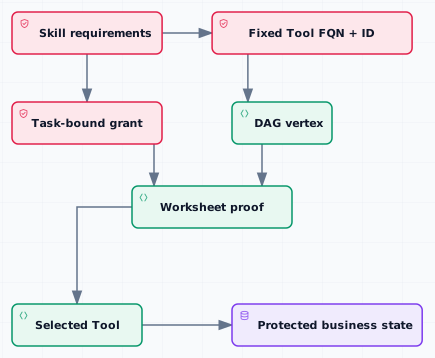
Authorization is the proof that a workflow step may use a particular value or mutate a protected application object. A fixed Tool requirement is the discovery constraint that the skill expects a particular Tool; the two checks work together but neither replaces the other.
### Proven values and grants
The workflow carries proven values through a worksheet and can issue a Task-bound grant for a protected vertex. The grant binds the intended recipient or state object to the Agent skill and is copied into the execution when the Task is dispatched. A Tool consumes the proof and checks the expected object, witness, or capability before mutating application state.
The stored `Grant` material is copyable (`T` must be `copy + store`), so a recurring Task does not consume a remaining-use counter. The configured grant count is the number of protected-vertex entries in the Task-bound vector, not a quota or balance. Each execution copies the appropriate material into a one-use `ProvenValue`; that copied proof must still match the recipient UID, worksheet, vertex/Task context, and input commitment before the Tool mutates state.
#### Fixed Tool requirements
A fixed Tool entry records the Tool FQN and registry identity that a skill expects. Registration checks that the FQN is registered at transaction time, but application developers should also read back the selected DAG vertex, Tool ID, registry ID, immutable schema, authorization mode, witness, and business policy. This is how an application prevents a discovery match from being mistaken for proof of asset authorization.
#### Protecting a business asset
1. Keep the business object and its mutation capability in explicit application custody.
2. Bind the protected vertex to the expected Tool and skill requirements.
3. Create the Task with the authorization binding for the intended recipient or object.
4. Let execution carry the grant and worksheet to the Tool.
5. Have the Tool check its own state invariant before performing the mutation.
6. Verify the accepted output and resulting business state after settlement.
Authorization does not decide whether an off-chain response is trustworthy. Use [Verifiers and Result Trust](/talus-docs-v2.1.0/concepts/04-verifiers-and-result-trust.md) for that decision and [Registered Keys and Signed Tool Communication](/talus-docs-v2.1.0/concepts/10-registered-keys-and-signed-tool-communication.md) for signed-message mechanics.
**Next**
Continue to [Registered Keys and Signed Tool Communication](/talus-docs-v2.1.0/concepts/10-registered-keys-and-signed-tool-communication.md) for key-bound evidence.
---
# Agent Instructions
This documentation is published with GitBook. GitBook is the documentation platform designed so that both humans and AI agents can read, navigate, and reason over technical content effectively. Learn more at gitbook.com.
## Querying This Documentation
If you need additional information that is not directly available in this page, you can query the documentation dynamically by asking a question.
Perform an HTTP GET request on the following URL with the `ask` and `goal` query parameters:
```
GET https://docs.talus.network/talus-docs-v2.1.0/concepts/09-authorization-and-fixed-tools.md?ask=&goal=
```
`ask` is the immediate question: it should be specific, self-contained, and written in natural language.
`goal` is what the user is ultimately trying to achieve, the reason they need the answer. Sharing it helps GitBook give you a better, more relevant answer. A goal is most helpful when it describes the outcome the user wants rather than restating the question. For example, with `ask=how do I create an API token`, a goal like `build a script that syncs our docs to a CMS` lets GitBook tailor the answer to that use case.
The response will contain a direct answer to the question and relevant excerpts and sources from the documentation.
Use this mechanism when the answer is not explicitly present in the current page, you need clarification or additional context, or you want to retrieve related documentation sections.