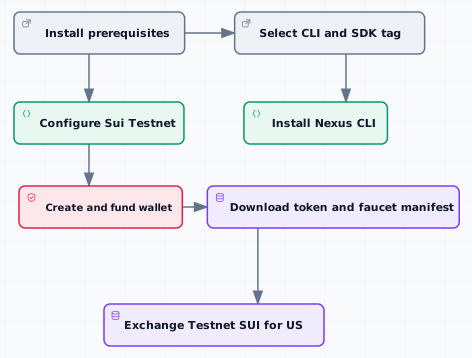
> For the complete documentation index, see [llms.txt](https://docs.talus.network/llms.txt). Markdown versions of documentation pages are available by appending `.md` to page URLs; this page is available as [Markdown](https://docs.talus.network/talus-docs-v2.1.0/guides/getting-started/setup.md).
# Developer Setup
{% hint style="info" %}
**Audience:** New Nexus developers preparing a Testnet CLI, wallet, and Talus `$US` balance.
**Goal:** Install the Nexus CLI/SDK, configure Sui Testnet, download the published Talus token/faucet objects, and obtain `$US` without exposing private keys.
{% endhint %}
This setup separates three trust boundaries: the Nexus CLI/SDK release, the Sui Testnet wallet, and the versioned Talus token/faucet object manifest. Do not substitute one artifact for another.
### Prerequisites
* Git and a POSIX-compatible shell.
* `curl` and `jq`.
* Homebrew for the preferred CLI installation.
* The [Rust toolchain](https://www.rust-lang.org/tools/install) when adding the SDK or Toolkit to a Rust application, or using the source CLI fallback.
* The [Sui CLI](https://docs.sui.io/guides/developer/getting-started/sui-install) with Testnet support.
* Nexus CLI/SDK tag `v2.1.0`.
### Install Nexus CLI/SDK
{% hint style="info" %}
Due to the Sui upgrade, Nexus SDK, CLI, and Toolkit versions earlier than `v2.1.0` may not work correctly. Please upgrade to the latest version before continuing.
{% endhint %}
#### Preferred CLI installation with Homebrew
Install the Homebrew formula and expose its binary:
```bash
brew tap talus-network/tap
brew update
brew install talus-network/tap/nexus-cli
NEXUS_HOMEBREW_PREFIX="$(brew --prefix talus-network/tap/nexus-cli)"
export PATH="$NEXUS_HOMEBREW_PREFIX/bin:$PATH"
nexus --help
nexus conf --help
```
#### Preferred Rust integration from crates.io
For a Rust application, add the published [Nexus SDK](https://crates.io/crates/nexus-sdk) and [Nexus Toolkit](https://crates.io/crates/nexus-toolkit) packages at `2.1.0` from the application directory:
```bash
cargo add nexus-sdk@=2.1.0
cargo add nexus-toolkit@=2.1.0
```
#### Verified CLI installation from the GitHub release
The CLI workspace package is not published to crates.io. On Linux x86\_64, download the 2.1.0 release archive and verify it against the pinned SHA-256 digest below before extraction; verify the binary before adding it to `PATH`:
```bash
set -e
NEXUS_CLI_VERSION="2.1.0"
NEXUS_CLI_TARGET="x86_64-unknown-linux-musl"
NEXUS_CLI_URL="https://github.com/Talus-Network/nexus-sdk/releases/download/v${NEXUS_CLI_VERSION}/nexus-cli-${NEXUS_CLI_VERSION}-${NEXUS_CLI_TARGET}.tar.gz"
NEXUS_CLI_SHA256="6775b50e50effe21c4d44f2504fbc1e44df747fcbaa20a0e53fe78b279091360"
NEXUS_CLI_ROOT="${HOME}/.local/nexus-cli-v${NEXUS_CLI_VERSION}"
NEXUS_CLI_ARCHIVE="${NEXUS_CLI_ROOT}/nexus-cli.tar.gz"
NEXUS_CLI_EXTRACT="${NEXUS_CLI_ROOT}/extract"
NEXUS_CLI_ARCHIVE_VERIFIED=0
cleanup_failed_archive() {
if test "$NEXUS_CLI_ARCHIVE_VERIFIED" -ne 1; then
rm -f -- "$NEXUS_CLI_ARCHIVE"
fi
}
trap cleanup_failed_archive EXIT
install -d -m 700 "$NEXUS_CLI_ROOT"
rm -rf "$NEXUS_CLI_EXTRACT"
curl --fail --location --silent --show-error --output "$NEXUS_CLI_ARCHIVE" "$NEXUS_CLI_URL"
printf '%s %s\n' "$NEXUS_CLI_SHA256" "$NEXUS_CLI_ARCHIVE" | sha256sum -c -
NEXUS_CLI_ARCHIVE_VERIFIED=1
install -d -m 700 "$NEXUS_CLI_EXTRACT"
tar -xzf "$NEXUS_CLI_ARCHIVE" -C "$NEXUS_CLI_EXTRACT"
test "$("$NEXUS_CLI_EXTRACT/nexus" --version)" = "nexus-cli ${NEXUS_CLI_VERSION}"
install -d -m 700 "$NEXUS_CLI_ROOT/bin"
install -m 755 "$NEXUS_CLI_EXTRACT/nexus" "$NEXUS_CLI_ROOT/bin/nexus"
export PATH="$NEXUS_CLI_ROOT/bin:$PATH"
```
The same GitHub release publishes x86\_64 and arm64 macOS archives and an x86\_64 Debian package. Select the archive for the host target from the [2.1.0 release](https://github.com/Talus-Network/nexus-sdk/releases/tag/v2.1.0), copy its reviewed SHA-256 digest into the verification step, and retain the same failed-download/checksum cleanup before extraction. Do not install `nexus-cli` with `cargo install nexus-cli`; that package is not available on crates.io.
#### Fallback CLI installation from the public SDK source
You can also install from source:
```bash
set -e
NEXUS_CLI_VERSION="2.1.0"
NEXUS_CLI_SDK_TAG="v${NEXUS_CLI_VERSION}"
NEXUS_CLI_SDK_COMMIT="45d397aafcfbeeeaf5032d5fb9fa5d99b3f36205"
NEXUS_SDK_DIR="${PWD}/nexus-sdk"
NEXUS_CLI_ROOT="${HOME}/.local/nexus-cli-v${NEXUS_CLI_VERSION}"
git clone https://github.com/Talus-Network/nexus-sdk.git "$NEXUS_SDK_DIR"
git -C "$NEXUS_SDK_DIR" fetch --tags --force
test "$(git -C "$NEXUS_SDK_DIR" cat-file -t "refs/tags/${NEXUS_CLI_SDK_TAG}")" = "tag"
test "$(git -C "$NEXUS_SDK_DIR" rev-parse "refs/tags/${NEXUS_CLI_SDK_TAG}^{commit}")" = "$NEXUS_CLI_SDK_COMMIT"
git -C "$NEXUS_SDK_DIR" checkout --detach "refs/tags/${NEXUS_CLI_SDK_TAG}"
test "$(git -C "$NEXUS_SDK_DIR" rev-parse HEAD)" = "$NEXUS_CLI_SDK_COMMIT"
install -d -m 700 "$NEXUS_CLI_ROOT"
cargo install --locked --root "$NEXUS_CLI_ROOT" --path "$NEXUS_SDK_DIR/cli"
NEXUS_CLI_BIN="$NEXUS_CLI_ROOT/bin/nexus"
test -x "$NEXUS_CLI_BIN"
test "$($NEXUS_CLI_BIN --version)" = "nexus-cli ${NEXUS_CLI_VERSION}"
export PATH="$NEXUS_CLI_ROOT/bin:$PATH"
```
#### Verify the fallback CLI
```bash
nexus --help
nexus conf --help
```
The explicit root isolates the source installation. The export applies to this shell; set `NEXUS_CLI_ROOT` in your shell startup file and export `PATH="$NEXUS_CLI_ROOT/bin:$PATH"` there only if you want the CLI to persist across new shells.
#### Release and reference scope
Use the `v2.1.0` CLI/SDK instructions above: the source route verifies the annotated release tag and exact checkout, while the binary route verifies the pinned host archive digest before extraction. The Nexus object bundles and TGE manifests below are independently versioned deployment/discovery artifacts; validate each recorded URL and checksum separately.
#### Verify deployment artifacts before use
Keep this shell open for all four artifact blocks below. Run this helper once before downloading; it removes an older destination, verifies the downloaded bytes in a same-directory temporary file, checks TGE JSON network metadata when supplied, and installs only a verified file. A failed download, digest, network, or move exits through the cleanup trap before configuration or object reads can consume the artifact.
```bash
set -Eeuo pipefail
ARTIFACT_TMP=""
cleanup_verified_artifact() {
if test -n "${ARTIFACT_TMP:-}"; then
rm -f -- "$ARTIFACT_TMP"
fi
}
trap cleanup_verified_artifact EXIT INT TERM
download_verified_artifact() {
local url="$1" expected_sha256="$2" destination="$3" expected_network="${4:-}"
rm -f -- "$destination"
ARTIFACT_TMP="$(mktemp "${destination}.tmp.XXXXXX")"
if ! curl --fail --location --silent --show-error --output "$ARTIFACT_TMP" "$url"; then
printf '%s\n' "artifact download failed: $url" >&2
return 1
fi
if ! printf '%s %s\n' "$expected_sha256" "$ARTIFACT_TMP" | sha256sum -c - >/dev/null; then
printf '%s\n' "artifact checksum failed: $url" >&2
return 1
fi
if test -n "$expected_network" && ! jq -e --arg expected_network "$expected_network" '.metadata.network == $expected_network' "$ARTIFACT_TMP" >/dev/null; then
printf '%s\n' "artifact network metadata failed: $url" >&2
return 1
fi
if ! mv -- "$ARTIFACT_TMP" "$destination"; then
printf '%s\n' "artifact install failed: $destination" >&2
return 1
fi
ARTIFACT_TMP=""
}
```
The recorded TOML digests bind each object bundle to its network URL; the TGE JSON calls below additionally require `metadata.network` to match the selected network. Do not replace a URL, digest, or network-specific destination with a value from another environment.
### Download and configure Nexus objects
Download the nexus objects for cli configurations:
```bash
set -e
NEXUS_TESTNET_OBJECTS_URL="https://storage.googleapis.com/production-talus-sui-objects/v2.0.0-rc.final/objects.testnet.toml"
NEXUS_TESTNET_OBJECTS_SHA256="6fe209e8e836cb1e05f4d8aa2e22259e75d128c34c18a04ca01b9d7b8cc4a674"
NEXUS_CONFIG_DIR="${NEXUS_CONFIG_DIR:?Set NEXUS_CONFIG_DIR to a private configuration directory}"
NEXUS_TESTNET_OBJECTS="$NEXUS_CONFIG_DIR/objects.testnet.toml"
install -d -m 700 "$NEXUS_CONFIG_DIR"
download_verified_artifact "$NEXUS_TESTNET_OBJECTS_URL" "$NEXUS_TESTNET_OBJECTS_SHA256" "$NEXUS_TESTNET_OBJECTS"
```
### Configure Sui Testnet
List configured environments before adding another alias:
```bash
sui client envs
```
If `testnet` is absent, add it, then select it and print the active environment:
```bash
set -e
sui client new-env --alias testnet --rpc https://fullnode.testnet.sui.io:443
sui client switch --env testnet
sui client active-env
```
The final command should print `testnet`. Stop on any other network; the object manifest below is Testnet-only.
### Create and fund a Sui wallet
Create an Ed25519 address or select an existing Testnet address:
```bash
sui client new-address ed25519
sui client addresses
sui client active-address
```
Do not export or paste the private key into shell history. Keep the Sui keystore protected and follow your provider's approved signer-import procedure before configuring Nexus mutations.
Request Testnet SUI for the active address, then verify at least two owned SUI coin objects are available: one for the `$US` exchange input and a different one for transaction gas.
```bash
set -e
SUI_ADDRESS=""
sui client switch --address "$SUI_ADDRESS"
sui client faucet --address "$SUI_ADDRESS"
sui client balance "$SUI_ADDRESS" --coin-type 0x2::sui::SUI --with-coins
sui client gas "$SUI_ADDRESS" --json
```
Configure Nexus Testnet after confirming the Sui environment, address, and two owned SUI coins:
```bash
nexus conf set --sui.rpc-url https://fullnode.testnet.sui.io/ --nexus.objects "$NEXUS_TESTNET_OBJECTS" --data-storage.testnet
```
Do not download the TGE manifest or start the faucet flow until Nexus configuration succeeds.
The Sui faucet funds gas; it does not provide Talus `$US`.
### Download the Testnet token and faucet objects
The versioned TGE manifest is public discovery data for the Talus token and faucet. It is not a Nexus network-object bundle, private capability, or signing authority, and it must not be passed to a Nexus CLI `--objects` option.
```bash
TALUS_TESTNET_TGE_URL="https://storage.googleapis.com/production-talus-tge-objects/v1.1.2/objects.testnet.json"
TALUS_TESTNET_TGE_SHA256="57b96e2430dbfecf5fa042dc388d2f722f400a30e6b74beede55dcad72486267"
TALUS_TESTNET_TGE="$NEXUS_CONFIG_DIR/objects.testnet.json"
download_verified_artifact "$TALUS_TESTNET_TGE_URL" "$TALUS_TESTNET_TGE_SHA256" "$TALUS_TESTNET_TGE" testnet
if ! jq -e '(.talus_token.package_id | type == "string") and (.talus_faucet.package_id | type == "string") and (.talus_faucet.faucet_object_id | type == "string") and (.talus_token.package_id != "null") and (.talus_faucet.package_id != "null") and (.talus_faucet.faucet_object_id != "null")' "$TALUS_TESTNET_TGE" >/dev/null; then
rm -f -- "$TALUS_TESTNET_TGE"
printf '%s\n' 'Testnet TGE manifest has invalid token or faucet IDs' >&2
exit 1
fi
```
Load the three public IDs used below:
```bash
TALUS_TOKEN_PACKAGE_ID="$(jq -r '.talus_token.package_id' "$TALUS_TESTNET_TGE")"
TALUS_FAUCET_PACKAGE_ID="$(jq -r '.talus_faucet.package_id' "$TALUS_TESTNET_TGE")"
TALUS_FAUCET_OBJECT_ID="$(jq -r '.talus_faucet.faucet_object_id' "$TALUS_TESTNET_TGE")"
sui client object "$TALUS_TOKEN_PACKAGE_ID" --json
sui client object "$TALUS_FAUCET_OBJECT_ID" --json
```
Do not use the manifest's treasury or upgrade capability IDs as user inputs. Object IDs are not capabilities, and the wallet created above does not own those privileged objects.
### Exchange Testnet SUI for Talus `$US`
Choose two distinct owned SUI coin object IDs from `sui client gas`: a small payment coin for the exchange and a separate gas coin. The faucet's public `mint` function consumes part of the payment coin at the on-chain exchange rate, returns unused SUI, and transfers `$US` to the transaction sender.
```bash
SUI_PAYMENT_COIN_ID=""
SUI_GAS_COIN_ID=""
sui client call \
--package "$TALUS_FAUCET_PACKAGE_ID" \
--module faucet \
--function mint \
--type-args "$TALUS_TOKEN_PACKAGE_ID::us::US" "0x2::sui::SUI" \
--args "$TALUS_FAUCET_OBJECT_ID" "$SUI_PAYMENT_COIN_ID" \
--gas "$SUI_GAS_COIN_ID" \
--json
sui client balance "$SUI_ADDRESS" \
--coin-type "$TALUS_TOKEN_PACKAGE_ID::us::US" \
--with-coins
```
Record the transaction digest, SUI spent, `$US` received, faucet object version, and final balances.
### Nexus object and signer boundary
Nexus CLI commands require the configured release-matched Nexus package/object bindings in addition to the TGE manifest. Wallet and token readiness do not authorize Nexus mutations. Obtain the protected signer procedure from the network operator or wallet provider, confirm that its documented configuration path is present in `nexus conf set --help`, and follow that procedure before signing a Nexus mutation. Until then, stop at Sui reads, the Testnet faucet flow, and query-only SDK/Explorer/API inspection.
### Nexus Mainnet
Configure Mainnet separately. The Mainnet Nexus bundle and token discovery manifest have their own URLs; do not reuse Testnet files or run the Testnet faucet flow on Mainnet.
```bash
set -e
NEXUS_MAINNET_OBJECTS_URL="https://storage.googleapis.com/production-talus-sui-objects/v2.0.0-rc.final/objects.mainnet.toml"
NEXUS_MAINNET_OBJECTS_SHA256="39b5cb1504186ee18bb9db26c328d48cd238b377addd70779bdbfdd207c4d477"
NEXUS_CONFIG_DIR="${NEXUS_CONFIG_DIR:?Set NEXUS_CONFIG_DIR to a private configuration directory}"
NEXUS_MAINNET_OBJECTS="$NEXUS_CONFIG_DIR/objects.mainnet.toml"
TALUS_MAINNET_TGE_URL="https://storage.googleapis.com/production-talus-tge-objects/v1.1.2/objects.mainnet.json"
TALUS_MAINNET_TGE_SHA256="23eec2bc7dfced61989a8006708319a3e237381fa6770b71fb6d119364421c5b"
TALUS_MAINNET_TGE="$NEXUS_CONFIG_DIR/objects.mainnet.json"
install -d -m 700 "$NEXUS_CONFIG_DIR"
download_verified_artifact "$NEXUS_MAINNET_OBJECTS_URL" "$NEXUS_MAINNET_OBJECTS_SHA256" "$NEXUS_MAINNET_OBJECTS"
download_verified_artifact "$TALUS_MAINNET_TGE_URL" "$TALUS_MAINNET_TGE_SHA256" "$TALUS_MAINNET_TGE" mainnet
if ! jq -e '.talus_faucet.package_id == "null" and .talus_faucet.faucet_object_id == "null"' "$TALUS_MAINNET_TGE" >/dev/null; then
rm -f -- "$TALUS_MAINNET_TGE"
printf '%s\n' 'Mainnet TGE manifest unexpectedly exposes a faucet' >&2
exit 1
fi
trap - EXIT INT TERM
```
The v1.1.2 Mainnet manifest publishes token discovery only. Its faucet package and faucet object fields are the literal string `"null"`, so it does not publish a Mainnet faucet flow. Do not construct a faucet call from this file.
Add or select the Sui Mainnet environment, then select a funded Mainnet address before any wallet-backed action:
```bash
set -e
sui client envs
sui client new-env --alias mainnet --rpc https://fullnode.mainnet.sui.io:443
sui client switch --env mainnet
sui client active-env
sui client addresses
SUI_MAINNET_ADDRESS=""
sui client switch --address "$SUI_MAINNET_ADDRESS"
sui client active-address
sui client gas "$SUI_MAINNET_ADDRESS" --json
```
If `mainnet` is already listed, do not add it again. If you need a new address, run `sui client new-address ed25519` after selecting Mainnet, record the resulting address, and fund it through an approved Mainnet wallet path. `sui client active-env` must print `mainnet`, and the gas read must show coins owned by the selected Mainnet address. Do not use the Testnet faucet command on Mainnet.
Configure the Nexus CLI with the Mainnet RPC and release-matched TOML:
```bash
nexus conf set \
--sui.rpc-url https://fullnode.mainnet.sui.io/ \
--nexus.objects "$NEXUS_MAINNET_OBJECTS"
```
After selecting Mainnet and configuring its objects, read the published Mainnet token package:
```bash
TALUS_MAINNET_TGE="$NEXUS_CONFIG_DIR/objects.mainnet.json"
TALUS_MAINNET_TOKEN_PACKAGE_ID="$(jq -r '.talus_token.package_id' "$TALUS_MAINNET_TGE")"
sui client object "$TALUS_MAINNET_TOKEN_PACKAGE_ID" --json
```
The pinned CLI has a Testnet-only `--data-storage.testnet` preset and no `--data-storage.mainnet` flag. The command above updates the default Nexus configuration with the Mainnet RPC and object bindings while retaining any storage settings that were already present. Do not treat retained Testnet storage settings as Mainnet values. Configure a Mainnet remote-storage backend only from operator-supplied values using the generic storage flags shown by `nexus conf set --help`.
`nexus conf set` updates one configuration file by default; it does not create named network profiles. Switching it to Mainnet replaces its RPC and Nexus object bindings. The Mainnet TGE JSON remains token discovery data only; do not pass it to Nexus CLI configuration or use privileged IDs from it as user inputs. Nexus mutations remain blocked until the protected signer procedure is complete and any required Mainnet storage values are supplied. Before returning to the Testnet faucet flow, restore the Testnet inputs:
```bash
set -e
nexus conf set --sui.rpc-url https://fullnode.testnet.sui.io/ --nexus.objects "$NEXUS_TESTNET_OBJECTS" --data-storage.testnet
sui client switch --env testnet
sui client active-env
sui client switch --address "$SUI_ADDRESS"
sui client active-address
sui client gas "$SUI_ADDRESS" --json
```
Confirm that the displayed environment, address, and gas objects match Testnet before continuing.
### Next
After the matching Nexus object bindings and protected signer path are supplied, continue with [Build an Agent Package](/talus-docs-v2.1.0/guides/agent-usage/build-agent-package.md), [Build an Off-Chain Tool](/talus-docs-v2.1.0/guides/tool-development/build-offchain-tool.md), or the generated [SDK reference](/talus-docs-v2.1.0/reference/sdk.md).
---
# Agent Instructions
This documentation is published with GitBook. GitBook is the documentation platform designed so that both humans and AI agents can read, navigate, and reason over technical content effectively. Learn more at gitbook.com.
## Querying This Documentation
If you need additional information that is not directly available in this page, you can query the documentation dynamically by asking a question.
Perform an HTTP GET request on the following URL with the `ask` and `goal` query parameters:
```
GET https://docs.talus.network/talus-docs-v2.1.0/guides/getting-started/setup.md?ask=&goal=
```
`ask` is the immediate question: it should be specific, self-contained, and written in natural language.
`goal` is what the user is ultimately trying to achieve, the reason they need the answer. Sharing it helps GitBook give you a better, more relevant answer. A goal is most helpful when it describes the outcome the user wants rather than restating the question. For example, with `ask=how do I create an API token`, a goal like `build a script that syncs our docs to a CMS` lets GitBook tailor the answer to that use case.
The response will contain a direct answer to the question and relevant excerpts and sources from the documentation.
Use this mechanism when the answer is not explicitly present in the current page, you need clarification or additional context, or you want to retrieve related documentation sections.