> For the complete documentation index, see [llms.txt](https://docs.talus.network/llms.txt). Markdown versions of documentation pages are available by appending `.md` to page URLs; this page is available as [Markdown](https://docs.talus.network/talus-docs-v2.1.0/guides/nexus-api.md).

# Nexus API

{% hint style="info" %}
**Audience:** Developers building an external dApp, dashboard, bot, or data pipeline that reads a hosted Nexus deployment.

**Goal:** Configure a provisional hosted URL and provider-issued API key, consume REST and SSE safely, and understand the public response and recovery contract.
{% endhint %}

The [**Nexus API**](https://api.taluslabs.dev/) is a hosted, read-only HTTP boundary over indexed Nexus state.

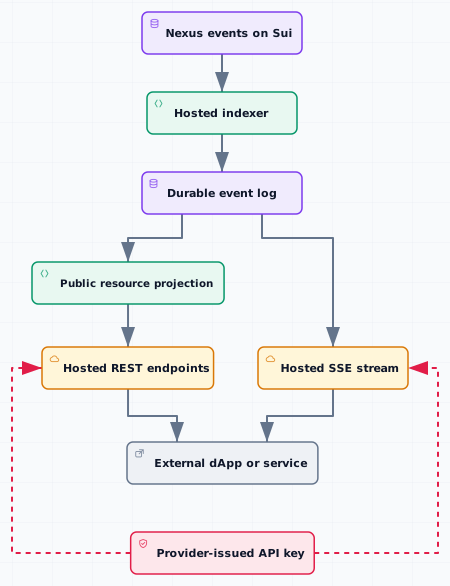
<figure><picture><source srcset="/files/NC9vIK7iVw8eWRuNx2LT" media="(prefers-color-scheme: dark)"><img src="https://3395888576-files.gitbook.io/~/files/v0/b/gitbook-x-prod.appspot.com/o/spaces%2FLPrUNT846cHDCVQcRD3f%2Fuploads%2Fgit-blob-05d9b9d969dfc9fb5361866ba95e3184a354cb8c%2Ff14-nexus-api-projection-light.svg?alt=media" alt="Nexus events to hosted API projections"></picture><figcaption></figcaption></figure>

The architecture figure separates the hosted service from your application: the provider owns indexing and projections, while your code owns presentation, cursor persistence, retry policy, and secret custody. The API is a read surface; state changes still use a wallet-approved CLI or SDK transaction flow.

<figure><picture><source srcset="/files/XK00HTly1mCXOcXtbxpE" media="(prefers-color-scheme: dark)"><img src="https://3395888576-files.gitbook.io/~/files/v0/b/gitbook-x-prod.appspot.com/o/spaces%2FLPrUNT846cHDCVQcRD3f%2Fuploads%2Fgit-blob-3398a204ec4464f3e56939559e9fbf682018e9de%2Fd32-key-rest-light.svg?alt=media" alt="Use an out-of-band key for the hosted REST API"></picture><figcaption><p>Phase 1: Deliver an API key and call hosted REST. Keyed facts: the Provider issues x-api-key out of band; the external app / backend receives it; the GET request sends the header to Hosted Nexus API for authentication.</p></figcaption></figure>

<figure><picture><source srcset="/files/ts58PJi1Htnrp2h2KT6C" media="(prefers-color-scheme: dark)"><img src="https://3395888576-files.gitbook.io/~/files/v0/b/gitbook-x-prod.appspot.com/o/spaces%2FLPrUNT846cHDCVQcRD3f%2Fuploads%2Fgit-blob-072cff3a69ff1bae4fee67c97181a7d039ecfa6f%2Fd32-projection-response-light.svg?alt=media" alt="Hosted API reads a projection and preserves errors"></picture><figcaption><p>Phase 2: Read a REST projection with an explicit error response. Keyed facts: external dApp / backend sends GET with x-api-key to the Hosted Nexus API; the projection returns JSON or an explicit error, and the API preserves status, body, request ID, and rate headers to the caller.</p></figcaption></figure>

<figure><picture><source srcset="/files/I0ypesgEKU1mEWcZF0ul" media="(prefers-color-scheme: dark)"><img src="https://3395888576-files.gitbook.io/~/files/v0/b/gitbook-x-prod.appspot.com/o/spaces%2FLPrUNT846cHDCVQcRD3f%2Fuploads%2Fgit-blob-942bcd03c167665ca677821ef25e8ee7d6771884%2Fd32-sse-readback-light.svg?alt=media" alt="SSE signals trigger a fresh REST readback"></picture><figcaption><p>Phase 3: Use SSE signals and fresh REST readback. Keyed facts: the external dApp / backend opens SSE with a cursor; the Event log replays missed events and keeps a live tail; the client performs a fresh REST readback after the event.</p></figcaption></figure>

The sequence keeps credentials server-side and treats SSE as an invalidation and replay signal rather than a substitute for authoritative REST reads. A disconnect, replay gap, rate limit, stale projection, or envelope-free timeout becomes an explicit degraded state followed by the documented retry or re-read action.

### Start here

<table data-view="cards"><thead><tr><th></th><th data-type="content-ref"></th></tr></thead><tbody><tr><td><strong>Tutorial</strong> — configure a provider-issued key, read resources, stream events, assemble a raw-HTTP dApp, and port it to React</td><td><a href="/talus-docs-v2.1.0/guides/nexus-api/tutorial.md">Build a dApp on Nexus API</a></td></tr><tr><td><strong>Connect a dApp</strong> — keep the key in a backend relay and expose only same-origin public data to a browser</td><td><a href="/talus-docs-v2.1.0/guides/nexus-api/connect-a-dapp.md">Connect a Nexus API dApp</a></td></tr><tr><td><strong>Raw REST and SSE consumer</strong> — the typed-client page now uses page-local public types and standard fetch/EventSource-compatible behavior</td><td><a href="/talus-docs-v2.1.0/guides/nexus-api/typescript-client.md">Nexus API TypeScript Client</a></td></tr><tr><td><strong>API reference</strong> — scopes, resources, envelopes, status values, events, rate limits, and errors</td><td></td></tr><tr><td><strong>Troubleshooting</strong> — diagnose credentials, projection lag, cursors, rate limits, and service responses</td><td><a href="/talus-docs-v2.1.0/guides/nexus-api/troubleshooting.md">Nexus API Troubleshooting</a></td></tr></tbody></table>

#### Configure the hosted consumer boundary

```bash
# Mainnet
export NEXUS_API_URL="https://api.taluslabs.dev"

# Testnet
export NEXUS_API_TESTNET_URL="https://api.taluslabs.dev"
```

Obtain NEXUS\_API\_KEY from the provider through the agreed secure out-of-band channel. The public consumer contract does not assume a self-service key dashboard, a public credential-minting service, or a live service at the placeholder URL. Store the key in a secret manager or a mode-0600 temporary file, send it only from your server-side relay, and remove it after a short-lived test.

#### What it serves

| Resource family                                                | Indexed state                               | Concept                                                                                                              |
| -------------------------------------------------------------- | ------------------------------------------- | -------------------------------------------------------------------------------------------------------------------- |
| /agents, skills, revisions                                     | Agent registry records and skill contracts  | [The Talus Agent](/talus-docs-v2.1.0/concepts/01-talus-agent.md)                                                     |
| /dags                                                          | Published DAG objects                       | [DAG and Execution](/talus-docs-v2.1.0/concepts/05-workflow-dag-execution.md)                                        |
| /tools                                                         | Tool registry records                       | [Tools and Skill Packages](/talus-docs-v2.1.0/concepts/03-tools-and-skill-packages.md)                               |
| /tasks, occurrences, reserves                                  | Scheduled Task state                        | [Scheduling](/talus-docs-v2.1.0/concepts/12-scheduling.md)                                                           |
| /executions, walks, events, verdicts, failures, payment ledger | DAGExecution traces and payment projections | [DAG and Execution](/talus-docs-v2.1.0/concepts/05-workflow-dag-execution.md)                                        |
| /payments, /priority-fee-vault/events                          | Execution payments and fee-vault activity   | [Payment Vaults, Reserves, and Settlement](/talus-docs-v2.1.0/concepts/06-payment-vaults-reserves-and-settlement.md) |
| /leaders                                                       | Public leader registry records              | [Registries and Discovery](/talus-docs-v2.1.0/concepts/08-registries-and-discovery.md)                               |
| /events/stream                                                 | The deployment's decoded event log          | [Verifiers and Result Trust](/talus-docs-v2.1.0/concepts/04-verifiers-and-result-trust.md)                           |

The public projection may omit Task rejection or Invocation fields. If a deployment does not publish a field or event, use the provider’s documented schema and do not infer the missing state from an empty response.

#### Read, react, and recover

REST responses are the source for the view; the SSE stream is a timely, replayable signal that tells the application when to re-read. List pages use an opaque next\_token, statuses are open sets, and a missing row can mean projection lag rather than absence. The [tutorial](/talus-docs-v2.1.0/guides/nexus-api/tutorial.md) and [document](https://api.taluslabs.dev/docs) show the exact envelopes and cursor rules.

{% hint style="success" %}
**Checkpoint.** You are ready when a server-side test can read /openapi.json, call one scoped resource endpoint, open /events/stream, preserve the last event id, and render a retryable state without ever putting the API key in browser code or command arguments.
{% endhint %}


---

# Agent Instructions
This documentation is published with GitBook. GitBook is the documentation platform designed so that both humans and AI agents can read, navigate, and reason over technical content effectively. Learn more at gitbook.com.

## Querying This Documentation
If you need additional information that is not directly available in this page, you can query the documentation dynamically by asking a question.

Perform an HTTP GET request on the following URL with the `ask` and `goal` query parameters:

```
GET https://docs.talus.network/talus-docs-v2.1.0/guides/nexus-api.md?ask=<question>&goal=<user_goal>
```

`ask` is the immediate question: it should be specific, self-contained, and written in natural language.
`goal` is what the user is ultimately trying to achieve, the reason they need the answer. Sharing it helps GitBook give you a better, more relevant answer. A goal is most helpful when it describes the outcome the user wants rather than restating the question. For example, with `ask=how do I create an API token`, a goal like `build a script that syncs our docs to a CMS` lets GitBook tailor the answer to that use case.

The response will contain a direct answer to the question and relevant excerpts and sources from the documentation.

Use this mechanism when the answer is not explicitly present in the current page, you need clarification or additional context, or you want to retrieve related documentation sections.
