> For the complete documentation index, see [llms.txt](https://docs.talus.network/llms.txt). Markdown versions of documentation pages are available by appending `.md` to page URLs; this page is available as [Markdown](https://docs.talus.network/talus-docs-v2.1.0/guides/nexus-api/connect-a-dapp.md).
# Connect a Nexus API dApp
{% hint style="info" %}
**Audience:** Developers wiring an external frontend, bot, or backend to the hosted Nexus API.
**Goal:** Choose a relay shape that keeps the provider-issued key server-side, preserves public response diagnostics, and supports REST plus replayable SSE.
{% endhint %}
Every integration answers one question first: **where does the key live?** It lives in a process you control on the server side, never in a browser bundle, public environment variable, local storage, URL, or source repository. Three patterns cover the normal external consumer shapes.
| Stack | Key lives in | Public browser path |
| ---------------------- | ----------------------------------- | ------------------------------- |
| Full-stack framework | Route handlers or server actions | Same-origin REST and SSE relay |
| Static SPA | A reviewed reverse proxy or sidecar | Same-origin REST and SSE relay |
| Bot or backend service | The service process | Direct server-side REST and SSE |
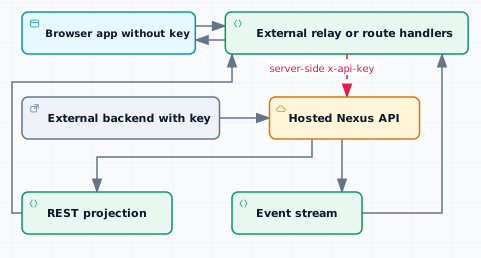
The architecture figure shows the boundary the application must preserve: the provider owns the hosted API, your server-side process owns the secret, and the browser receives only public response and event state.
```mermaid
sequenceDiagram
participant Browser
participant Relay as External relay
participant API as Hosted Nexus API
participant Log as Event log
Browser->>Relay: GET same-origin resource
Relay->>API: Forward filters with x-api-key
API-->>Relay: Preserve status, body, request id, and rate diagnostics
Relay-->>Browser: Public response with local cache policy
Browser->>Relay: Open SSE and send last cursor
Relay->>API: Forward encoded last_event_id query
API->>Log: Replay missed events
Log-->>Relay: Event frames and keep-alives
Relay-->>Browser: Relayed frames and keep-alives
```
The sequence keeps credential injection and cursor forwarding on the server side. REST is the view source; SSE wakes the application to re-read and recover. These examples use one explicit upstream URL contract: `NEXUS_API_URL` must be an origin-root `https:` URL with no path, query, or fragment, because the relay appends `/executions` and `/events/stream` at the origin root. If a provider publishes a path-prefixed endpoint, put a separate reviewed adapter in front of it rather than passing that path to these examples.
### Pattern A — full-stack framework relay
A framework route handler can proxy only the exact resources the UI needs. This example forwards executions and the event stream, preserves status and body, and exposes a positive response-header allowlist:
The relay validates `NEXUS_API_URL` as an absolute `https:` URL before it constructs an upstream request or attaches `x-api-key`. This example has no plaintext loopback exception: local browser-to-relay HTTP is acceptable, but the credential-bearing upstream target must use HTTPS.
```ts
const FORWARDED = [
"content-type",
"x-request-id",
"x-error-code",
"retry-after",
"ratelimit-limit",
"ratelimit-remaining",
"ratelimit-reset",
] as const;
function publicHeaders(upstream: Headers, contentType: string): Headers {
const headers = new Headers();
for (const name of FORWARDED) {
const value = upstream.get(name);
if (value) headers.set(name, value);
}
if (!headers.has("content-type")) headers.set("content-type", contentType);
return headers;
}
function requireHttps(raw: string): string {
let parsed: URL;
try {
parsed = new URL(raw);
} catch {
throw new Error("NEXUS_API_URL must be an absolute https URL");
}
if (parsed.protocol !== "https:") throw new Error("NEXUS_API_URL must use https before an API key is attached");
if (parsed.pathname !== "/" || parsed.search || parsed.hash) throw new Error("NEXUS_API_URL must be an origin-root https URL without a path, query, or fragment");
return parsed.origin;
}
function requireConfig(): { url: string; key: string } {
const url = process.env.NEXUS_API_URL;
const key = process.env.NEXUS_API_KEY;
if (!url || !key) throw new Error("server-side NEXUS_API_URL and NEXUS_API_KEY are required");
return { url: requireHttps(url), key };
}
export async function GET(request: Request): Promise {
const config = requireConfig();
const upstreamUrl = new URL("/executions", config.url);
upstreamUrl.search = new URL(request.url).search;
const upstream = await fetch(upstreamUrl, {
headers: { "x-api-key": config.key, accept: "application/json" },
signal: request.signal,
});
const headers = publicHeaders(upstream.headers, "application/json");
headers.set("cache-control", "no-store");
return new Response(upstream.body, { status: upstream.status, headers });
}
```
Use a separate allowlisted handler for the stream so it forwards Last-Event-ID, sets no-cache and no-transform, and disables proxy buffering. Abort the upstream fetch when the browser disconnects. Reject every path outside a fixed route set before constructing the upstream URL.
```ts
export async function GET(request: Request): Promise {
const config = requireConfig();
const upstreamUrl = new URL("/events/stream", config.url);
upstreamUrl.search = new URL(request.url).search;
const lastEventId = request.headers.get("last-event-id");
const upstream = await fetch(upstreamUrl, {
headers: {
"x-api-key": config.key,
accept: "text/event-stream",
...(lastEventId ? { "last-event-id": lastEventId } : {}),
},
signal: request.signal,
});
const headers = publicHeaders(upstream.headers, "text/event-stream");
headers.set("cache-control", "no-cache, no-transform");
headers.set("x-accel-buffering", "no");
return new Response(upstream.body, { status: upstream.status, headers });
}
```
The allowlist must drop cookies, redirects, authentication challenges, CSP, site-data, upstream cache, and body-framing or encoding headers. Add application authentication, authorization, CSRF protection, and observability before exposing the relay to users.
#### Pattern B — SPA behind a reviewed proxy
A static SPA uses the same public paths behind a reverse proxy or sidecar. The proxy may inject x-api-key and disable SSE buffering, but transport-only configuration is not sufficient for a production cross-origin boundary: prove the positive response-header policy with a test that preserves status/body and drops unsafe headers.
```
Browser -> /executions -> reviewed proxy -> https://api.example.invalid/executions
Browser -> /events/stream -> reviewed proxy -> https://api.example.invalid/events/stream
```
Bind a local development proxy to loopback, keep NEXUS\_API\_KEY in the server process, and never expose it through a VITE-prefixed variable. The [React tutorial](/talus-docs-v2.1.0/guides/nexus-api/tutorial/05-port-to-react.md) uses the repository's temporary Vite fixture to typecheck, audit, and scan the real bundle.
#### Pattern C — direct backend service
A backend service can call the hosted API directly. Keep the key in the service secret manager, use the smallest provider-granted scopes, retry only idempotent reads, and persist event cursors after validating complete frames:
```ts
const baseUrl = requireHttps(process.env.NEXUS_API_URL ?? "https://api.taluslabs.dev");
const apiKey = process.env.NEXUS_API_KEY;
if (!apiKey) throw new Error("NEXUS_API_KEY is required in the server process");
const response = await fetch(new URL("/executions?page_size=20", baseUrl), {
headers: { "x-api-key": apiKey, accept: "application/json" },
});
if (!response.ok) {
const requestId = response.headers.get("x-request-id");
throw new Error("read failed with " + response.status + " request " + (requestId ?? "unknown"));
}
```
For SSE, use a parser that preserves the last numeric id and sends it as Last-Event-ID on reconnect. Re-read the affected REST resource after a frame; the stream is a replayable signal, not a second database.
#### Relay checklist
* Allowlist exact paths and methods; reject dot segments, encoded slash or backslash, malformed escapes, and unknown routes before adding the key.
* Forward the upstream status and body instead of replacing an API error with a local 502.
* Forward only content type, request id, conditional error code, retry, and rate-limit diagnostics.
* Set local REST no-store and SSE no-cache, no-transform plus X-Accel-Buffering no.
* Forward the encoded `last_event_id` query without dropping the relay path or existing query parameters.
* Abort authenticated upstream work when the browser disconnects.
* Render response strings as text and validate JSON, event shape, content type, and bounded body detail before use.
* Reconnect with the last validated event id and use bounded exponential backoff for 408, 429, and 5xx.
* Run the consumer's relay and bundle checks before shipping, then run the public Docs lint gate.
```bash
just md-lint
```
{% hint style="success" %}
**Checkpoint.** DevTools shows no x-api-key on browser requests, relay tests prove unsafe headers do not cross the origin, a dropped stream resumes from its last cursor, and a bundle scan finds no credential.
{% endhint %}
#### Next
Use the [HTTP API reference](https://api.taluslabs.dev/docs) for public endpoint contracts, or return to the [Nexus API tutorial](/talus-docs-v2.1.0/guides/nexus-api/tutorial.md).
---
# Agent Instructions
This documentation is published with GitBook. GitBook is the documentation platform designed so that both humans and AI agents can read, navigate, and reason over technical content effectively. Learn more at gitbook.com.
## Querying This Documentation
If you need additional information that is not directly available in this page, you can query the documentation dynamically by asking a question.
Perform an HTTP GET request on the following URL with the `ask` and `goal` query parameters:
```
GET https://docs.talus.network/talus-docs-v2.1.0/guides/nexus-api/connect-a-dapp.md?ask=&goal=
```
`ask` is the immediate question: it should be specific, self-contained, and written in natural language.
`goal` is what the user is ultimately trying to achieve, the reason they need the answer. Sharing it helps GitBook give you a better, more relevant answer. A goal is most helpful when it describes the outcome the user wants rather than restating the question. For example, with `ask=how do I create an API token`, a goal like `build a script that syncs our docs to a CMS` lets GitBook tailor the answer to that use case.
The response will contain a direct answer to the question and relevant excerpts and sources from the documentation.
Use this mechanism when the answer is not explicitly present in the current page, you need clarification or additional context, or you want to retrieve related documentation sections.