> For the complete documentation index, see [llms.txt](https://docs.talus.network/llms.txt). Markdown versions of documentation pages are available by appending `.md` to page URLs; this page is available as [Markdown](https://docs.talus.network/talus-docs-v2.1.0/guides/tap-development/upgrade-tap-package.md).
# Upgrade demo\_tap and Preserve Both Tool Paths
{% hint style="info" %}
**Audience:** Talus Agent Package (TAP) developers maintaining a deployed `demo_tap`-style application.
**Goal:** Design a compatible or breaking package upgrade that preserves business state and proves both direct and delayed Tool paths.
{% endhint %}
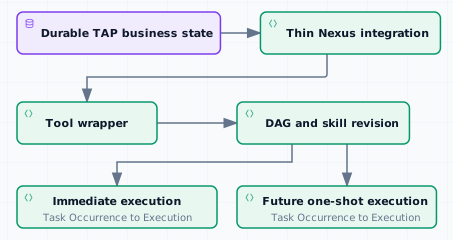
Treat a TAP upgrade as an application cutover, not as a blind dependency replacement. Keep durable business state in application-defined modules and keep Nexus integration, Tool wrappers, DAG bindings, and skill revisions thin enough to replace when the Nexus contract changes.
### Deployment boundary and evidence tuple
`demo_tap` is a source example and test fixture name, not a public deployment or a promise that a shared package, Agent, skill, DAG, or Tool is available on the reader’s network. The direct and delayed paths below are illustrative source shapes unless an operator supplies an exact deployment tuple. Before testing an upgrade, obtain a deployment manifest or perform exact selected-build discovery for the TAP package ID and upgrade lineage, embedded Agent ID and `AgentPaymentVault`, skill ID/revision and payment/schedule policy, DAG ID, Tool FQNs and stable Tool IDs, Tool witness/input requirements, and the relevant owner capabilities. Record the source revision, publish/registration transaction digests, network, and object IDs. If the tuple or an exact discovery path is unavailable, stop and do not invent public IDs.
#### Define the two proof paths
* **Illustrative direct path:** after the operator has supplied or discovered the tuple, select the Agent-funded skill’s `schedule_once` policy and create an immediately eligible Task and Occurrence. Verify the Tool’s required inputs, result, transfer effect, payment state, transaction effects, occurrence settlement, and Task close. Use [Execute and Verify the Transfer](/talus-docs-v2.1.0/guides/tap-development/execute-and-verify-transfer.md) for the illustrative TAP transfer shape and [Execute and Settle an Agent](/talus-docs-v2.1.0/guides/agent-usage/execute-and-settle-agent.md) for Task/Execution inspection; do not treat either page as proof of a public `demo_tap` deployment.
* **Illustrative delayed path:** after the operator confirms the delayed Tool identity, its exact input ports and object/witness prerequisites, the Agent-funded skill, and enough Agent-vault reserve, create one future one-shot initial Task and Occurrence. When that Tool fires, capture a follow-up transfer Task ID only from authoritative causal evidence that binds all of the following: the initial delayed Execution ID and active vertex/walk; the upgraded TAP package/module/source identity; the transaction effect, emitted event, or object creation that produced the follow-up Task ID; the Agent ID, skill ID/revision, and payment source; and the relation from the initial Tool execution to that follow-up Task. If the selected public surface cannot expose that tuple, mark the delayed path unproven and stop; never accept a guessed or unrelated Task ID. Then verify and settle the initial delayed chain and the causally identified follow-up Task/Occurrence/Execution chain. Use [Schedule an Asset-Management Flow](/talus-docs-v2.1.0/guides/agent-usage/schedule-asset-management-flow.md) for the generic delayed Task and Occurrence procedure. Recurring is valid only for a different skill whose selected schedule policy explicitly permits it; it is not the illustrative `demo_tap` proof path.
These are separate proof journeys: a successful immediate Task does not prove that a future one-shot Occurrence, the delayed Tool-created follow-up Task, reserves, or settlement survived the upgrade. Record every Task ID, Occurrence ID, Execution ID, payment state, transaction effect, transfer/business-state effect, occurrence settlement, and close result for both chains.
The source fixture has two separate immutable Tool contracts; inventory and migrate them independently:
| Fixture Tool | Registration contract and schema | Witness/capability/readback boundary | Path prerequisite |
| -------------------------- | ------------------------------------------------------------------------------------------------------------------------------------------------------------------------------------------------------------------------------------------------------------------------------------------ | ------------------------------------------------------------------------------------------------------------------------------------------------------------------------------------------------------------------------------------------------------------------------------------------------------------------------------ | ----------------------------------------------------------------------------------------------------------------------------------------------------------------------------------------------------- |
| `demo_onchain_vertex` | FQN `demo.taluslabs.demo_onchain_vertex@1`, module `demo_onchain_vertex::execute`; operator supplies the Tool ID and witness ID. Ports are `0` object state, `1` data recipient, and `2` many-data message; output is `transferred` with `amount`, `recipient`, and many `message` values. | Record the `DemoTapState` transfer witness ID, the separate `CloneableOwnerCap`, and the separate `CloneableOwnerCap` returned by registration. A compatible pointer change uses this Tool's own `OverTool` cap and proves old/new FQN, Tool ID, module, schema, witness, and capability readbacks. | The direct test stores a transfer `Coin` in TAP state before scheduling and funds the Agent vault for the Task budget. |
| `demo_delayed_fire_vertex` | FQN `demo.taluslabs.demo_delayed_fire_vertex@1`, module `demo_delayed_fire_vertex::execute`; operator supplies the Tool ID and witness ID. Ports `0`–`3`, `6`, `7`, and `8` are object inputs; `4` and `5` are data inputs; output is `fired` with `amount` and `task`. | Keep a second independent `CloneableOwnerCap` migration and readback for this Tool, plus its separate `CloneableOwnerCap`. Do not use the direct Tool's witness, schema, or capability as a substitute. | The delayed test funds the Agent vault above the configured follow-up budget, schedules a future initial occurrence, and requires causal evidence for the follow-up Task created by the delayed Tool. |
Registration locks an owned `Coin` for each Tool; after that Tool is unregistered and its configured lock elapses, `nexus tool claim-collateral` uses that Tool’s own `CloneableOwnerCap` to reclaim the locked collateral. The cashier capability is not a substitute for Tool pointer migration or collateral claim. The `collect-invocations` and `collect-deposits` commands require the exact cashier capability, matching bindings/package IDs, and effects readback.
The existing `DemoTapState`, embedded Agent and `AgentPaymentVault`, both DAGs, both skill records/revisions, and all Task/Occurrence/Execution objects remain separate stable identities to compare before and after the package upgrade. The package update alone does not migrate those objects; prove the direct stored-coin path and the delayed vault/follow-up path separately.
If either chain fails, preserve its transaction digests, object/effect readbacks, and business-state evidence, stop scheduling new work against the changed revision, and use the selected build’s documented inspection, settlement, or forward-recovery path. Recover and prove both chains independently; never claim that closing one Task, refunding one payment, or upgrading the package repaired the other chain.
#### Preserve custody and inventory
Retain clear custody of the TAP `UpgradeCap` and each Tool owner capability. Inventory both capability domains separately: `CloneableOwnerCap` is needed for a compatible Tool package-pointer migration, while `CloneableOwnerCap` is needed for accepted-policy configuration and Invocation/deposit collection. Do not move either capability into an opaque helper solely to make an upgrade transaction shorter, and do not assume one capability substitutes for the other.
Before editing the package, inventory:
* the embedded Agent and its application state objects;
* business assets, witnesses, capabilities, and object IDs;
* each Tool identity, FQN, module, schema, witness, `CloneableOwnerCap`, and `CloneableOwnerCap`; record which capability is held, delegated, or required for the selected change;
* each DAG, skill record, input commitment, and skill revision;
* Tasks, schedules, reserves, pending results, and live executions;
* Nexus dependency IDs, package lineage, type origins, and changed public signatures.
Check the Tool ABI, input/output schema, witness requirements, output variants, DAG ports, skill revision requirements, payment behavior, and application-state invariants against the target release. Registry endorsement is outside the TAP package owner’s upgrade authority and outside this guide; this procedure does not require registry administration.
#### Compatible change
Use this shape only when the Tool FQN, module, schema, witness, DAG ports, skill contract, and application invariants remain compatible.
1. Update Nexus dependencies and the affected implementation.
2. Build, test, and dry-run the package upgrade.
3. Upgrade within the TAP package lineage while retaining `UpgradeCap` custody.
4. Migrate each compatible Tool pointer with its own `CloneableOwnerCap`.
5. Record that the owner-side pointer migration resets the external registry endorsement to `verified = false`; coordinate any renewed endorsement with the registry authority outside this guide. No registry-admin transaction is part of the TAP owner procedure, and this flag is not an Invocation or admission gate.
6. Keep DAG and skill identities only when their contracts remain compatible.
7. Prove the direct path and delayed scheduled path with fresh evidence.
8. Settle both paths and verify the durable business state after each result.
#### Incompatible change
Use this shape when an FQN, module, schema, witness, invocation contract, output variant, DAG port, or skill requirement is incompatible.
1. Publish the changed TAP package while preserving the old package and its evidence.
2. Register new Tool identities for every incompatible FQN, module, schema, witness, or invocation contract.
3. Publish a replacement DAG with the new Tool identities and ports.
4. Create or activate a new skill revision bound to the replacement DAG.
5. Direct new Tasks to the new skill revision.
6. Let already-admitted Executions settle or expire against their pinned contracts. Recheck pending or unadmitted occurrences at admission: if their old DAG, skill, Tool, payment, or schedule is stale/rejected, cancel or close them and recreate them under the replacement revision instead of assuming that every old Task can drain.
7. Prove direct and delayed paths against the replacement package.
8. Verify business-state invariants, reserves, committed results, and payment settlement before completing cutover. An on-chain Tool can mutate application state atomically before a later result consume/commit/settlement transaction; cleanup, refund, or abort does not roll that mutation back. Make the mutation idempotent or compensatable and verify business state separately from workflow/result state.
Do not attempt to mutate an old Tool identity in place when its immutable registration contract changed. A new identity makes the break visible to DAGs, skills, Tasks, and readers. Registry endorsement is outside the TAP package owner’s authority and outside this guide; no registry-admin step is part of this upgrade procedure.
#### Evidence and forward-recovery boundary
Keep pre-upgrade and post-upgrade package IDs, dependency IDs, object IDs, Tool/DAG/skill identities, transaction effects, and settlement receipts. Package rollback is not assumed; if one path fails before settlement, stop scheduling new work against that revision, preserve the old and failing evidence, drain compatible work where supported, and prepare a forward recovery release or explicit application cutover. Do not claim that a package upgrade can recover application state that its code does not protect.
**Outcome**
The TAP owner can explain which objects and capabilities remain under custody, why the selected change is compatible or incompatible, and how both direct and delayed paths prove business-state and settlement correctness.
**Next**
Use [Protocol Upgrades and Compatibility](/talus-docs-v2.1.0/concepts/14-protocol-upgrades-and-compatibility.md) for the release-level decision tree.
---
# Agent Instructions
This documentation is published with GitBook. GitBook is the documentation platform designed so that both humans and AI agents can read, navigate, and reason over technical content effectively. Learn more at gitbook.com.
## Querying This Documentation
If you need additional information that is not directly available in this page, you can query the documentation dynamically by asking a question.
Perform an HTTP GET request on the following URL with the `ask` and `goal` query parameters:
```
GET https://docs.talus.network/talus-docs-v2.1.0/guides/tap-development/upgrade-tap-package.md?ask=&goal=
```
`ask` is the immediate question: it should be specific, self-contained, and written in natural language.
`goal` is what the user is ultimately trying to achieve, the reason they need the answer. Sharing it helps GitBook give you a better, more relevant answer. A goal is most helpful when it describes the outcome the user wants rather than restating the question. For example, with `ask=how do I create an API token`, a goal like `build a script that syncs our docs to a CMS` lets GitBook tailor the answer to that use case.
The response will contain a direct answer to the question and relevant excerpts and sources from the documentation.
Use this mechanism when the answer is not explicitly present in the current page, you need clarification or additional context, or you want to retrieve related documentation sections.