> For the complete documentation index, see [llms.txt](https://docs.talus.network/llms.txt). Markdown versions of documentation pages are available by appending `.md` to page URLs; this page is available as [Markdown](https://docs.talus.network/talus-docs-v2.1.0/guides/tokenomics/configure-tool-invocation-and-collect.md).
# Configure Tool Invocation Rules and Collect Revenue
{% hint style="info" %}
**Audience:** Tool developers and Tool owners.
**Goal:** Configure accepted invocation policies, verify one Invocation’s receipts, and collect Tool revenue without confusing it with execution funding or gas.
{% endhint %}
Tool invocation policy answers what a caller may pay and what a Tool owner may collect after a completed Invocation. This page follows the policy-backed Invocation path and treats a missing receipt, capability, or transaction effect as an incomplete outcome.
> **Before moving value:** Verify selected-build help, generated bindings, package IDs, capabilities, contract tests, and transaction effects. Do not invent a missing command or accept an unmatched deployment tuple.
### Configure the Tool and cashier
Configure the Tool’s FixedPrice cost through the CLI, then verify the resulting Tool, cashier, payment, effects, and events:
Before running these commands, retain the registration-saved `cashier_admin_cap_id` and inspect the exact Tool record. It must be a `CloneableOwnerCap` capability bound to the exact ToolCashier being configured; the ToolCashier object ID and `CloneableOwnerCap` are different objects and are not valid substitutes for `--cashier-admin`. If `cashier_admin_cap_id` is absent, does not match the ToolCashier, or only the other capability/object is available, stop and record the missing authority.
```bash
nexus tool set-invocation-cost \
--tool-fqn "" \
--cashier-admin \
--cost
nexus tool inspect --tool-fqn "" --json
```
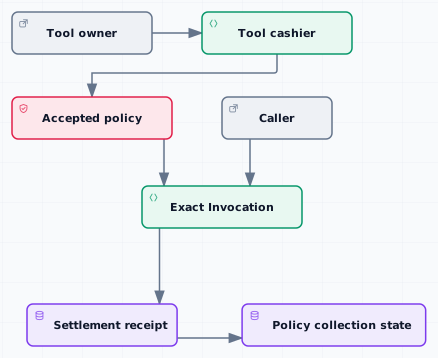
The cashier-admin capability is distinct from `CloneableOwnerCap`; use the generated [CLI](/talus-docs-v2.1.0/reference/cli/tool.md) and [SDK ToolActions](/talus-docs-v2.1.0/reference/sdk/actions-tool.md) references for the command/API shape. Inspect the Tool and ToolCashier IDs, accepted policies, Task/Occurrence/Execution, `ExecutionPayment`, exact Invocation, transaction effects, and emitted events before collection.
#### Policy-backed path
#### 1. Choose the policy
Use only an invocation policy the selected Tool cashier accepts. Policy families are FixedPrice, including price zero, FiniteCredits, TimePass, and Custom policies. FixedPrice is mandatory; entitlement and Custom policies are optional. Record the accepted policy witness, Tool and cashier IDs, beneficiary, amount, and refund destination.
The Tool’s configured price or policy is not transaction gas and is not automatically the Agent’s execution budget. A user or Agent funds the execution separately; the Invocation policy determines the Tool-side charge and receipt.
#### 2. Configure and verify (policy path)
Use the CLI or SDK to configure or inspect the policy after verifying that its bindings match the selected network. If an installed client lacks a documented reader or mutation, correct the client/deployment mismatch or use the generated [Tool cashier reference](/talus-docs-v2.1.0/reference/move/nexus_tool/tool_cashier.md) for source inspection rather than inventing a command.
Before accepting a caller request, verify the Tool ID, cashier ID, accepted policy, beneficiary, and immutable terms. Existing Invocations retain the terms selected at admission; changing the policy does not silently rewrite a completed Invocation.
#### 3. Inspect an exact Invocation (policy path)
An Invocation identity includes the execution, vertex key, Tool and cashier IDs, beneficiary, policy, economic source, amount, refund address, and funds. For repetitive vertices, the iteration key is part of the identity. Record the exact ID and do not use an FQN or Tool URL as a substitute.
Inspect the Invocation state and its linear lock or settlement receipt. A charged receipt proves the Tool-side amount was delivered to the configured cashier/deposit path. A refund receipt proves the policy reserve returned through its recorded refund path. Pending means the result-resolution or payment path still needs to finish.
#### 4. Collect revenue (policy path)
After completed Invocations are settled, read the cashier or deposit inbox and collect only the policy-homogeneous batch that the Tool owner surface accepts. Retain the collection transaction effects and the resulting balance. Collection is Tool revenue; it does not withdraw the Task reserve or pay Sui transaction gas.
#### 5. Verify the three meters
1. **Tool revenue:** the completed Invocation amount delivered to the Tool cashier or deposit.
2. **Execution payment:** the Task and `ExecutionPayment` amount used to fund the workflow and settle its result.
3. **Transaction gas:** the SUI spent by the address that submitted each Sui transaction.
**Outcome**
You have a recorded accepted policy, exact Invocation identity, settlement receipt, and cashier/deposit evidence showing what the Tool can collect. If any identity, capability, or effect is missing, stop and record the incomplete step rather than calling the revenue path complete.
**Next**
For execution funding, use [Fund Agent- and User-Paid Executions](/talus-docs-v2.1.0/guides/tokenomics/fund-agent-and-user-executions.md). For priority liquidity, use [Use the Priority-Fee Vault as a $US Buyer](/talus-docs-v2.1.0/guides/tokenomics/use-priority-fee-vault.md).
---
# Agent Instructions
This documentation is published with GitBook. GitBook is the documentation platform designed so that both humans and AI agents can read, navigate, and reason over technical content effectively. Learn more at gitbook.com.
## Querying This Documentation
If you need additional information that is not directly available in this page, you can query the documentation dynamically by asking a question.
Perform an HTTP GET request on the following URL with the `ask` and `goal` query parameters:
```
GET https://docs.talus.network/talus-docs-v2.1.0/guides/tokenomics/configure-tool-invocation-and-collect.md?ask=&goal=
```
`ask` is the immediate question: it should be specific, self-contained, and written in natural language.
`goal` is what the user is ultimately trying to achieve, the reason they need the answer. Sharing it helps GitBook give you a better, more relevant answer. A goal is most helpful when it describes the outcome the user wants rather than restating the question. For example, with `ask=how do I create an API token`, a goal like `build a script that syncs our docs to a CMS` lets GitBook tailor the answer to that use case.
The response will contain a direct answer to the question and relevant excerpts and sources from the documentation.
Use this mechanism when the answer is not explicitly present in the current page, you need clarification or additional context, or you want to retrieve related documentation sections.